Opening, closing and locking the doors
Turning the key unlocks the driver’s door. Turning the key again unlocks the other doors.
Closes the moon roof (turn and hold)
Opens the moon roof (turn and hold)
Locks all the doors
Check that the door is securely locked.
Pressing the button unlocks the driver’s door. Pressing the button again within 3 seconds unlocks the other doors.
A buzzer sounds and the emergency flashers flash to indicate that the doors have been locked/unlocked. (Locked: once; Unlocked: twice)
If an attempt to lock the doors is made when a door is not fully closed, a buzzer sounds continuously for 5 seconds. Fully close the door to stop the buzzer, and lock the vehicle once more.
If a door is not opened within approximately 60 seconds after the vehicle is unlocked, the security feature automatically locks the vehicle again.
Using the wireless remote control to lock the doors will set the alarm system. (P. 85)
The front doors can be opened by pulling the inside handle even if the lock buttons are in the lock position.
Vehicles with power door lock system:
The door cannot be locked if either of the front doors is open and the key is in the engine switch.
The door cannot be opened from inside the vehicle when the lock is set.
Unlock Lock
These locks can be set to prevent children from opening the rear doors. Push down on each rear door switch to lock both rear doors.
|
Function |
Operation |
|
Shift position linked door locking function |
Shifting the shift lever out of P locks all the doors. |
|
Shift position linked door unlocking function |
Shifting the shift lever to P unlocks all the doors. |
|
Speed linked door locking function |
All the doors are locked when the vehicle speed is approximately 12 mph (20 km/h) or higher. |
|
Driver's door linked door unlocking function |
All the doors are unlocked when the driver's door is opened within 10 sec- onds after turning the engine switch to the “LOCK” position. |
Tailgate
Unlock the tailgate Lock the tailgate
1 Pull the handle
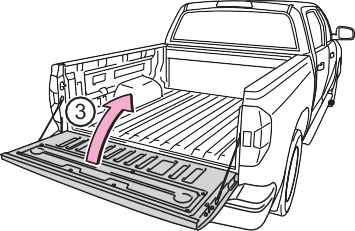
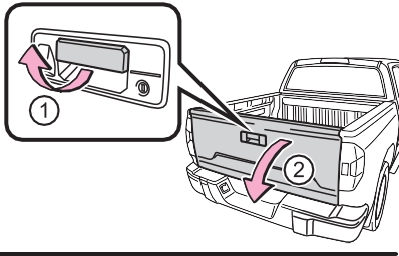 Open the tailgate slowly
The support cables will hold the tailgate horizontal.
After closing the tailgate, try pulling it toward you to make sure it is securely locked.
 Connector cover (Gray)
  Connector cover (White)
Store the connector covers in the glove box in a plastic bag when not using.
Tailgate wire harness con- nector (White)
Frame wire harness connec- tor (Gray)
Attach the connector cover (White) to the frame wire har- ness connector (Gray).
 Connector cover (White)
Frame wire harness connec- tor (Gray)
Open the tailgate.
Pull out the plastic wire protec- tor located in the vehicle bed by pressing the tabs and pulling the protector.
 Plastic wire protector
Pull out the wire harness from the vehicle bed.
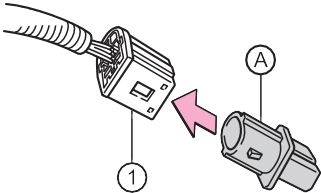 Attach the connector cover (Gray) to the tailgate wire har- ness connector (White).
Tailgate wire harness con- nector (White)
 Connector cover (Gray)
Open the tailgate to the angle where you can release the brackets on the support cables from the lugs on both sides.
Lift the support cable bracket up and slide it off.
To unhook the support cable bracket, keep pulling up the clip on the bracket and unhook the bracket.
Tilt the tailgate to about 45° from vertical and pull up the right side of the tailgate to unhook the right side.
Tilt the tailgate up to 15°.
Slide the tailgate a little to the right to unhook the left side.
To attach the tailgate, follow the removal procedure in reverse order.
step-up loading.
To get on the rear step bumper, use the shaded area in the illustra- tion.
Download Manual