Connecting Bluetooth®
The Bluetooth® word mark and logos are registered trademarks owned Bluetooth SIG, Inc. and any use of such marks by Panasonic Corporation is under license. Other trademarks and trade names are those of their respective owners.
For vehicles sold in the U.S.A. FCC ID: ACJ932YEAP01A727
NOTE:
<§15.19(a)(3)> This device complies with part 15 of the FCC Rules. Opera- tion is subject to the following two conditions: (1) This device may not cause harmful interference, and (2) this device must accept any interfer- ence received, including interference that may cause undesired operation.
FCC WARNING:
<§15.21> Changes or modifications not expressly approved by the party responsible for compliance could void the user’s authority to operate the equipment.
CAUTION:
<§2.1091> Radio frequency radiation exposure information:
This equipment complies with FCC radiation exposure limits set forth for an uncontrolled environment. This equipment should be installed and operated with minimum distance of 20 cm between the radiator and your body. This transmitter must not be co-located or operating in conjuction with any other antenna or transmitter.
For vehicles sold in Canada NOTE:
This device complies with Industry Canada licence-exempt RSS stan- dard(s). Operation is subject to the following two conditions: (1) this device may not cause interference, and (2) this device must accept any interfer- ence, including interference that may cause undesired operation of the device.
Le pràsent appareil est conforme aux CNR d’Industrie Canada applicables aux appareils radio exempts de licence. L’exploitation est autorisàe aux deux conditions suivantes: (1) l’appareil ne doit pas produire de brouillage, et (2) l’utilisateur de l’appareil doit accepter tout brouillage radioàlectrique subi, màªme si le brouillage est susceptible d’en compromettre le fonctionnement.
NOTE:
This radio transmitter (identify the device by certification number, or model number if Category II) has been approved by Industry Canada to operate with the antenna types listed below with the maximum permissible gain and required antenna impedance for each antenna type indicated. Antenna types not included in this list, having a gain greater than the maximum gain indicated for that type, are strictly prohibited for use with this device.
Le pràsent àmetteur radio (identifier le dispositif par son numàro de certifi- cation ou son numàro de modà¨le s’il fait partie du matàriel de catàgorie II) a àtà approuvà par Industrie Canada pour fonctionner avec les types d’antenne ànumàràs ci-dessous et ayant un gain admissible maximal et l’impàdance requise pour chaque type d’antenne. Les types d’antenne non inclus dans cette liste, ou dont le gain est supàrieur au gain maximal indiquà, sont strictement interdits pour l’exploitation de l’àmetteur.
Access to http://www.ptc.panasonic.eu/,enter the below Model No. into the keyword search box, you can download the latest “DECLARATION of CON- FORMITY” (DoC).
Model No. YEAP01D104

|
|



 phone
phone


To display the screen shown below, press the “SETUP” button and select “Bluetooth” on the “Setup” screen.
Select to connect the device to be used with multimedia sys- tem. (P. 365)
Select to register a Bluetooth® device to be used with multime- dia system. (P. 363)
Select to set detailed Bluetooth® system settings. (P. 368)
Select to delete registered devices. (P. 364)
Turn the Bluetooth® connection setting of your audio player on.
This function is not available when the Bluetooth® connection setting of your audio player is set to off.
Select “ Audio” on the “Select Audio Source” screen.
Follow the steps in “How to registering a Bluetooth® device” from step . (P. 363)
Turn the Bluetooth® connection setting of your cellular phone on. Press the  button.
Select “YES” to register a phone.
Follow the steps in “How to registering a Bluetooth® device” from step . (P. 363)
1 Display the “Bluetooth Setup” screen. (P. 360) Select “Add”.
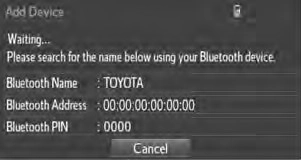 When this screen is displayed, search for the device name dis- played on this screen on the screen of your Bluetooth® device.
For details about operating the Bluetooth® device, see the manual that comes with it.
To cancel the registration, select “Cancel”.
A PIN-code is not required for SSP (Secure Simple Pairing) compatible Bluetooth® devices. Depending on the type of Bluetooth® device being connected, a message confirming registration may be displayed on the
Bluetooth® device’s screen. Respond and operate the Bluetooth® device according to the confirmation message.
Select “OK” when the connection status changes from “Connect- ing...” to “Connected”.
If an error message is displayed, follow the guidance on the screen to try again.
step . (P. 363)
1 Display the “Bluetooth Setup” screen. (P. 360) Select “Remove”.
Select the desired device.
A confirmation message will be displayed, select “Yes” to delete the device.
Check that a confirmation screen is displayed when the operation is complete.
Press the “SETUP” button.
Select “Bluetooth” on the “Setup” screen. Select the device to be con-
nected.
Supported profile icons will be dis- played.
Supported profile icons for cur- rently connected devices will illumi- nate.
Dimmed icons can be selected to connect to the function directly.
When you register a phone, auto connection will be activated. Always set it to this mode and leave the Bluetooth® phone in a place where a connection can be established.
When the engine switch is turned to the “ACC” or “ON” position, the sys- tem will search for a nearby cellular phone you have registered.
Next, the system automatically connects with the most recent of the phones connected to in the past. Then, the connection result is displayed.
Follow the steps in “Connecting a Bluetooth® device” from step . (P. 365)
Registering an additional device
Select “Select Device” on the “Bluetooth Audio” screen. For more information: P. 363
Selecting a registered device
Select “Select Device” on the “Bluetooth Audio” screen. For more information: P. 365
If the system cannot connect due to poor signal strength with the engine switch in the “ACC” or “ON” position, the system will automatically attempt to reconnect.
If the system is attempting to connect to a Bluetooth® phone and the Blue- tooth® phone is turned off and then back on, the system will attempt to recon-
nect.
You can confirm and change the registered device details.
Select “Device Info”. Following screen is displayed:
Device name
Change connection method (P. 367)
Bluetooth® address
Display your telephone num- ber
The number may not be dis- played depending on the model of phone.
Restore default settings
1 Select “Connect Audio Player from”. Select “Vehicle” or “Device”.
“Vehicle”: Connect the multimedia system to the portable audio player. “Device”: Connect the portable audio player to the multimedia system.
The following screen is displayed: Bluetooth® power on/off
You can change Bluetooth® function on/off
Change PIN-code (P. 368) Bluetooth® address
Display phone status
You can set the system to show the status confirmation display when connecting a telephone
You can set the system to show the status confirmation display when connecting an audio player
You can change the PIN-code that is used to register your Bluetooth®
devices in the system.
Select “Bluetooth PIN”.
Input a PIN-code, and select “OK”.
Download Manual