Other equipment
Clock

The digital clock indicates the time.
The hybrid system must be in “ACC” or“IG−ON”.
To set the hour: Push the “H” button.
To set the minutes: Push the “M” button.If the electrical power source has beendisconnected from the clock, the time displaywill automatically be set to 1:00.
When the instrument panel lights areturned on, the brightness of the time indicatorwill be reduced.
Rear view monitor system
The rear view monitor system assiststhe driver by displaying an image ofthe view behind the vehicle while backingup. The image is displayed in reverseon the screen. This allows theimage to appear in the same manner asthat of the rear view mirror.
To display the rear view image on thescreen, place the selector lever in the“R” position when the “IG−ON” mode isenabled.
If you move the selector lever out of the“R” position, the screen returns to theprevious screen. Operating another functionof the navigation system will displayanother screen.
The rear view monitor system is a supplementdevice intended to assist back up.When backing up, be sure to check behindand all around the vehicle visually.
CAUTION
Never depend on the rear viewmonitor system entirely when backingup. Always make sure your intendedpath is clear.
Use caution just as you would whenbacking up any vehicle.
Never back up while looking only atthe screen. The image on thescreen is different from actual conditions.Depicted distances betweenobjects and flat surfaces will differfrom actual distances. If you backup while looking only at the screen,you may hit a vehicle, a person oran object. When backing up, besure to check behind and all aroundthe vehicle visually and with mirrorsbefore proceeding.
Do not use the system when theback door is not completely closed.
If the back of the vehicle is hit, theposition and mounting angle of thecamera may change. Be sure tohave the camera’s position andmounting angle checked at yourToyota dealer.
If the temperature changes rapidly,such as when hot water is pouredon the vehicle in cold weather, thesystem may not operate normally.
If the camera lens becomes dirty, itcannot transmit a clear image. Ifwater droplets, snow, or mud adheresto the lens, rinse with waterand wipe with a soft cloth. If thelens is extremely dirty, wash it witha mild cleanser and rinse.
Use your own eyes to confirm thevehicle’s surroundings, as the displayedimage may become faint ordark, and moving images will bedistorted, or not entirely visiblewhen the outside temperature islow. When backing up, be sure tocheck behind and all around the vehiclevisually and with mirror beforeproceeding.
When replacing the tires, please consultyour Toyota dealer. If you replace thetires, the area displayed on the screenmay change.

AREA DISPLAYED ON SCREEN
Image is displayed approximately levelon screen.
- The area detected by the camera islimited. Objects which are close toeither corner of the bumper or underthe bumper cannot be seen on thescreen.
- The area displayed on the screenmay vary according to vehicle orientationor road conditions.
THE REAR VIEW MONITOR SYSTEMCAMERA

The rear view monitor system camera islocated on the back door as shown in theillustration. The camera uses a speciallens. The distance of the image that appearson the screen differs from the actualdistance.
In the following cases, it may becomedifficult to see the images on the screen,even when the system is functioning.
- In the dark (for example, at night)
- When the temperature near the lens isextremely high or low
- When water droplets are adhering tothe camera, or when humidity is high(for example, when it rains)
- When foreign matter (for example,snow or mud) adheres to the cameralens
- When the sun or the beam of headlightsis shining directly into the cameralens

If a bright light (for example, sunlight reflectedoff the vehicle body) is picked upby the camera, the smear effect* peculiarto the camera may occur.
*: Smear effect—A phenomenon that occurswhen a bright light (for example, sunlightreflected off the vehicle body) ispicked up by the camera; when transmittedby the camera, the light sourceappears to have a vertical streak aboveand below it.
Power outlets

Instrument panel

Rear console box
The power outlets are designed forpower supply for car accessories.
The hybrid system must be in “ACC” or“IG−ON” for the power outlets to be used.
NOTICE
- To prevent the fuse from beingblown, do not use the electricityover the total vehicle capacity of12V/120W.
- To prevent the battery from beingdischarged, do not use the poweroutlet longer than necessary whenthe hybrid system is not operating.
- Close the power outlet lid when thepower outlet is not in use. Insertinganything other than an appropriateplug that fits the outlet, or allowingany liquid to get into the outletmay cause electrical failure or shortcircuits.
Rear console box

To use the rear console box, open asshown in the illustration.
CAUTION
When opening the rear console box,take due care not to catch your fingers.
Glove boxes

Upper glove box

Lower glove box
To open the glove boxes, push eachbutton.
The inside of the upper glove box is separatedby the partition. When storing a longerobject, remove the partition.
With the instrument panel lights on, thelower glove box light will come on whenthe lower glove box is open.
CAUTION
To reduce the chance of injury incase of an accident or a sudden stop,always keep the glove box doorsclosed while driving.
Garage door opener
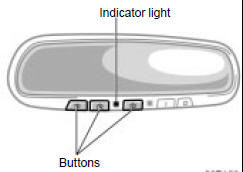
The garage door opener (HomeLink Universal Transceiver) is manufacturedunder license from HomeLink and canbe programmed to operate garagedoors, gates, entry doors, door locks,home lighting systems, and securitysystems, etc.
(a) Programing the HomeLink
The HomeLink in your vehicle has 3buttons and you can store one programfor each button.
To ensure correct programing into theHomeLink , install a new battery in thehand−held transmitter prior to programming.
The battery side of the hand−held transmittermust be pointed away from theHomeLink during the programming process.
For Canadian users, follow the procedurein “Programming an entrance gate/Programmingall devices in the Canadianmarket”.
When the programming the HomeLink forthe first time, erase the HomeLink memory once before following the stepsbelow to program the HomeLink . (See“(c) Erasing the entire HomeLink memory” on page 312. When carrying out(c), do not hold the buttons for longerthan 30 seconds.)
When registering the second and third signals,simply follow the steps listed below.If you erase the HomeLink memoryagain, any signals registered previouslywill be erased.
1. Decide which of 3 HomeLink buttonsyou want to program.
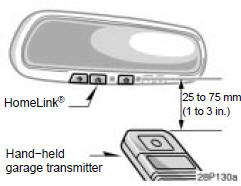
2. Place your hand−held garage transmitter25 to 75 mm (1 to 3 in.) away fromthe surface of the HomeLink .
Keep the red indicator light on theHomeLink in view while programming.
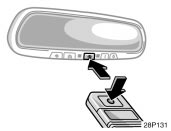
3. Simultaneously press and hold thehand−held garage transmitter buttonalong with the selected HomeLink button.Do not release the buttons until step 4has been completed.
4. When the indicator light on theHomeLink changes from a slow to arapid flash, you can release both buttons.
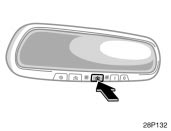
5. Test the operation of the HomeLink bypressing the newly programmed button.If programming a garage door opener,check to see if the garage door opensand closes.
If the garage door does not operate, identifyif your garage transmitter is of the“Rolling Code” type. Press and hold theprogrammed HomeLink button. The garagedoor has the rolling code feature ifthe indicator light (on the HomeLink )flashes rapidly and then remains lit after2 seconds. If your garage transmitter isthe “Rolling Code” type, proceed to theheading “Programming a rolling code system”.
6. Repeat steps 2 through 5 for each remainingHomeLink button to programanother device.
Programming a rolling code system
If your device is “Rolling Code”equipped, it is necessary to followsteps 1 through 4 under the heading“Programming the HomeLink ” beforeproceeding with the steps listed below.
1. Locate the “training” button on the ceilingmounted garage door opener motor.The exact location and color of thebutton may vary by brand of garagedoor opener. Refer to the owner’sguide supplied by the garage dooropener manufacturer for the location ofthis “training” button.
2. Press the “training” button on the ceilingmounted garage door opener motor.
Following this step, you have 30 secondsin which to initiate step 3 below.
3. Press and release the vehicle’s programmedHomeLink button twice. Thegarage door may open. If the doordoes open, the programming process iscomplete. If the door does not open,press and release the button a thirdtime. This third press and release willcomplete the programming process byopening the garage door.
The ceiling mounted garage door openermotor should now recognize theHomeLink unit and be able activate thegarage door up/down.
4. Repeat steps 1 through 3 each remainingHomeLink button to programanother rolling code system.
Programming an entrance gate/Programmingall devices in the Canadian market
1. Decide which of the 3 HomeLink buttonsyou want to program.
2. Place your hand−held gate/devicetransmitter 25 to 75 mm (1 to 3 in.)away from the surface of theHomeLink .
Keep the indicator light on the HomeLink in view while programming.
3. Press and hold the selectedHomeLink button.
4. Continuously press and release (cycle)the hand−held gate/device transmitterbutton every two seconds until step 5is complete.
5. When the indicator light on theHomeLink changes from a slow to arapid flash, you can release both buttons.
6. Test the operation of the HomeLink bypressing the newly programmed button.Check to see if the gate/device operatescorrectly.
7. Repeat steps 1 through 6 for each remainingHomeLink button to programanother device.
Programming other devices
To program other devices such as homesecurity systems, home door locks orlighting, contact your authorized Toyotadealer for assistance.
Reprogramming a button
Individual HomeLink buttons cannot beerased, however, to reprogram a singlebutton, follow the procedure “Programmingthe HomeLink ”.
(b) Operating the HomeLink
To operate the HomeLink , press the appropriateHomeLink button to activate theprogrammed device. The HomeLink indicatorlight should come on. TheHomeLink continues to send the signalfor up to 20 seconds as long as the buttonis pressed.
(c) Erasing the entire HomeLink memory (all three programs)
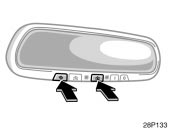
To erase all previously programmed codesat one time, press and hold down the 2outside buttons for 20 seconds until theindicator light flashes.
If you sell your vehicle, be sure to erasethe programs stored in the HomeLink memory.
For additional programming assistancewith your HomeLink UniversalTransceiver call the:
Toyota Customer Experience Center at1−800−331−4331 (U.S.A.)
Toyota Canada Customer InteractionCentre at 1−888−869−6828 (Canada)
Refer to HomeLink on the internet at:WWW.HOMELINK.COM
CAUTION
When programming the HomeLink Universal Transceiver, you may beoperating a garage door or otherdevice. Make sure people and objectsare out of the way of the garagedoor or other device to preventpotential harm or damage.
Do not use this HomeLink UniversalTransceiver with any garagedoor opener that lacks the safetystop and reverse feature as requiredby federal safety standards.(This includes any garage dooropener model manufactured beforeApril 1, 1982.) A garage door openerwhich cannot detect an object(signaling the door to stop and reverse),does not meet current federalsafety standards. Using a garagedoor opener without these featuresincreases risk of serious injury ordeath.
Auxiliary boxes
To use the box, open the lid as shownin the following illustrations.
CAUTION
To reduce the chance of injury incase of an accident or a suddenstop, always keep the auxiliary boxclosed while driving.
Auxiliary box on the ceiling—As this box is designed for holdinga light object such as an eyeglass,do not place any heavy objects init. Heavy objects may cause theholder to open and contents to flyout resulting in injuries.
NOTICE
Auxiliary box on the ceiling—In hot weather, inside of the vehicleceiling becomes very hot. Do notleave anything flammable or deformablesuch as a lighter, the glasses,etc. inside.

Front ceiling

Front side of the console box

On the instrument panel

Left side of the luggage compartment
Cup holders

For front seats

For rear seats
The cup holder is designed for holdingcups or drink−cans securely.
To use the cup holder, open the lid.
CAUTION
Do not place anything else otherthan cups or drink−cans on the cupholder, as such items may bethrown about in the compartmentand possibly injure people in thevehicle during sudden braking or inan accident.
To reduce the chance of injury incase of an accident or a suddenstop while driving, keep the cupholder closed when not in use.
Take due care not to catch yourfingers when the cup holder isopened.
Bottle holders

The bottle holders are designed to holdbottles securely.
CAUTION
Do not attempt to use the holder forany other purpose for which it wasintended. Inappropriately sized orshaped objects may be thrown aboutin the compartment and possibly injurepeople in the vehicle during asudden braking or an accident.
NOTICE
Do not put a cup or open bottle inthe bottle holder because the contentsmay spill when the door opensor closes.
Tie−down hooks

To secure your luggage, use the tie−down hooks as shown above.
See “—Stowing precautions” on page 344for precautions when loading luggage.
CAUTION
To avoid personal injury, keep the tie−down hooks retracted when not inuse.
Luggage storage box

1. To open the luggage storage box, turnthe knob to the “UNLOCK” position andopen the lid.

2. Hold the lid open by inserting the supportrod into the slot.
CAUTION
To reduce the chance of injury incase of an accident or a sudden stop,keep the luggage storage box closedand locked while driving.
Luggage cover

To use the luggage cover, pull it out ofthe retractor and hook it on the anchors.
CAUTION
Do not place anything on the luggagecover. Such items may be thrownaway and possibly injure people inthe vehicle during sudden braking ora collision.

To remove the luggage cover, lift it up.

You can stow the luggage cover in theluggage storage box in the luggagecompartment as shown in the illustration.At that time, adjust the cover so that“TOP” is facing up.
After removing the luggage cover, stow itin the luggage storage box or place itsomewhere other than the passengercompartment. This will prevent passengersfrom being injured in the event of a suddenstop or accident.

Floor mat

Use a floor mat of the correct size.
If the vehicle carpet and floor mat have2 holes, then they are designed for usewith locking clips. Attach the floor mat tothe vehicle carpet using the clips. Lockthe clips into the holes in the vehiclecarpet.

CAUTION
Make sure the floor mat is properlyplaced on the vehicle carpet. If thefloor mat slips and interferes with themovement of the pedals during driving,it may cause an accident.
Download Manual