Keys and Doors
Keys
Hybrid vehicle immobilizer system

1. Master keys with silver ornament (Vehiclesequipped with smart entry andstart system)—These keys work in everylock. Your Toyota dealer will needone of them to make a new key witha built−in transponder chip. Before youuse these keys, be sure to read “Smartentry and start system” on page 24.
2. Master keys without silver ornament(Vehicles not equipped with smart entryand start system)—These keys work inevery lock. Your Toyota dealer willneed one of them to make a new keywith a built−in transponder chip.
3. Mechanical keys (attached to the masterkeys)—These key work for the driver’sdoor only.
USING A MECHANICAL KEY

When you use the mechanical key includedon the side of the key, slide thelock knob in the arrow direction and takeout the key as shown. To put the keyback, slide the lock knob in the arrowdirection and replace the key. Be sure toput the key back when not in use.
Since the doors can be locked without akey, you should always carry a sparemaster key in case you accidentally lockyour keys inside the vehicle.
CAUTION
People with implanted pacemakersor cardiac defibrillators should keepaway from the smart entry and startsystem antennas, because the radiowaves may affect the operation ofsuch devices. For the antenna locations,see “ANTENNA LOCATIONS”on page 26.
Users of any electrical medical deviceother than implanted pacemakersand implanted cardiac defibrillatorsshould consult the manufacturerof the device for informationabout its operation under the influenceof radio waves. Radio wavescould have unexpected effects onthe operation of such medical devices.
If necessary, the smart function canbe disabled. See “DEACTIVATINGTHE SMART FUNCTION” on page34.
NOTICE
When using a key containing a transponderchip, observe the followingprecautions:
- Do not affix any material that cutsoff electromagnetic waves (such asa metal seal) on the key.
- Do not knock the key hard againstother objects.
- Do not leave the key exposed tohigh temperatures for a long period,such as on the dashboard or hoodunder direct sunlight.
- Do not put the key in water orwash it in an ultrasonic washer.
- Do not keep the key together withthe products emitting electromagneticwaves such as a cellularphone.
KEY NUMBER PLATE

Your key number is shown on the plate.Keep the plate in a safe place such asyour wallet, not in the vehicle.
If you should lose your keys or if youneed additional keys, duplicates can bemade by a Toyota dealer using the keynumber.
We recommend writing down the key numberand storing it in a safe place.
Smart entry and start system
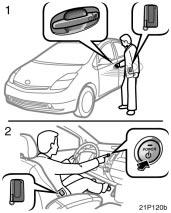
1. Locking and unlocking
2. Starting the hybrid system
By carrying a smart key, you can lockand unlock the doors and start the hybridsystem.
For locking the doors, see “Locking thedoors with smart function” on page 30.For unlocking the doors, see “Unlockingthe door(s) with smart function” on page31. For starting the hybrid system, see“Push button start system” on page 138.
If the smart key battery is discharged, thesmart function cannot be used. Use themechanical key attached to the smart keyby inserting it in the driver’s door keyholeto lock or unlock door. To start the hybridsystem, insert the smart key into the keyslot. In order to activate the smart function,the battery should be replaced. Fordetails, see “—Replacing battery” on page38.
You can deactivate the smart function byusing the cancel switch. In this case, allthe smart function will be deactivated. Fordetails, see “Deactivating the smart function”on page 34.
INFORMATION
- Be sure to take the smart key withyou.
- In the following cases, the smartfunction or wireless remote controlfeature may not operate properly. (Ifthis happens, use a mechanical keyto lock or unlock the driver’s doorand a smart key to start the hybridsystem.)
- When facilities issuing strongelectromagnetic waves such asTV towers, electric power stations,broadcasting stations arenearby.
- When you are carrying a smartkey together with a mobile communicationssystem such as atwo−way radio or cellular phone.
- When the smart key is in contactwith or covered by a metallic object.
- When another person is operatinga wireless remote control functionon another vehicle near yourvehicle.
- If you do not drive your vehicle,store the smart key, keeping it atleast 5 m (16 ft.) away from the vehicle.
CAUTION
- People with implanted pacemakersor cardiac defibrillators should keepaway from the smart entry and startsystem antennas, because the radiowaves may affect the operation ofsuch devices. For the antenna locations,see “ANTENNA LOCATIONS”on page 26.
- Users of any electrical medical deviceother than implanted pacemakersand implanted cardiac defibrillatorsshould consult the manufacturerof the device for informationabout its operation under the influenceof radio waves. Radio wavescould have unexpected effects onthe operation of such medical devices.
- If necessary, the smart function canbe disabled. See “DEACTIVATINGTHE SMART FUNCTION” on page34.
ANTENNA LOCATIONS
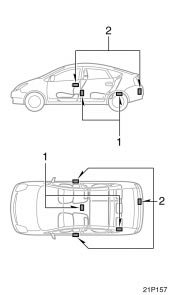
1. Antennas inside cabin
2. Antennas outside cabin
ALARMS AND WARNING LIGHT
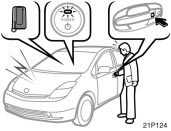
Your vehicle is equipped with alarmsinside and outside, as well as warninglight in the instrument cluster, that remindyou if there is a problem involvingthe smart entry and start system.
This warning light will come on when the“IG−ON” mode is enabled and will go offafter a few seconds.
If an alarm sounds or the warning lightcomes on, be sure to check your vehicleand smart key.
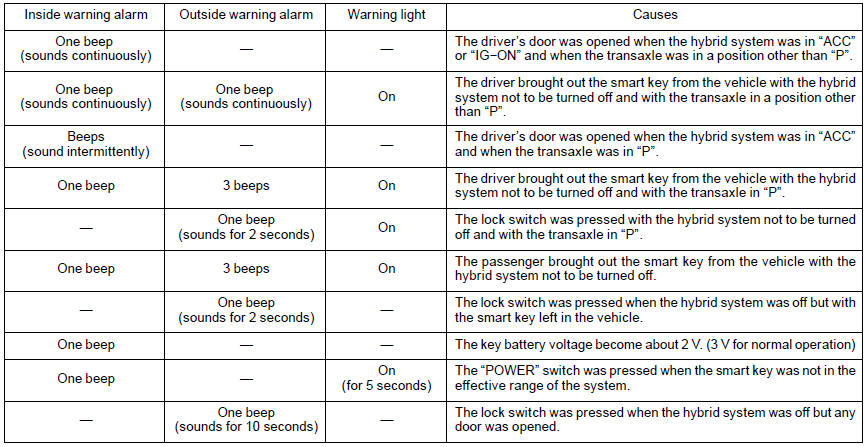
(a) The hybrid system was not turnedoff and the transaxle was in a positionother than “P”.
When the driver’s door is opened with thehybrid system in “ACC” or “IG−ON” andwith the transaxle in a position other than“P”.
Inside alarm: Beeps continuously
Multi−information display: Warning message
Alarms will be turned off by any of thefollowing operations:
- Closing the driver’s door
- Pressing the “P” position switch
- Turning off the hybrid system
(b) The smart key was brought outsidethe vehicle with the transaxle in aposition other than “P”.
When the driver’s door is opened orclosed with the hybrid system not to beturned off and with the transaxle in aposition other than “P”, it is determinedthat the smart key is not in the vehicle.
Inside alarm: Beeps continuously
Outside alarm: Beeps continuously
Warning light: On
Alarms will be turned off by any of thefollowing operations:
- Pressing the “P” position switch
- Bringing the smart key inside the vehicle
- Turning off the hybrid system
(c) The hybrid system was not turnedoff with the transaxle in “P”.
When the driver’s door is opened with thehybrid system in “ACC” and with thetransaxle in “P”.
Inside alarm: 3 beeps
In the “IG−ON” mode, an alarm will notsound.
(d) The smart key was brought outsidethe vehicle.
When the driver’s door is opened orclosed with the hybrid system not to beturned off (and with the transaxle in “P”),it is determined that the smart key is notin the vehicle.
Inside alarm: One beep
Outside alarm: 3 beeps
Warning light: On
(e) Locking with smart function was attemptedwith the hybrid system notto be turned off.
When you attempt to lock all the doorsusing smart locking function with the hybridsystem not to be turned off and withthe transaxle in a position other than “P”.
Outside alarm: One beep (sounds for 2seconds)
Warning light: On
At this time, the doors cannot belocked.
(f) The smart key was brought outsidethe vehicle.
When a door other than the driver’s dooris opened or closed with the hybrid systemnot to be turned off, it is determinedthat the smart key is not in the vehicle.
Inside alarm: One beep
Outside alarm: 3 beeps
Warning light: On
(g) Preventing the key from beinglocked inside the vehicle
When you close the door with the hybridsystem off but with the smart key left inthe vehicle, and attempt to lock all thedoors using smart locking function, it isdetermined that the smart key is in thevehicle.
Outside alarm: One beep (sounds for 2seconds)
INFORMATION
- This function may not operate whenthe smart key is left on the instrumentpanel, luggage cover, floor orin the glove box.
- The function may operate if thesmart key is brought outside but itis very close to the door window ordoor handle.
(h) Low smart key battery
When the hybrid system is turned to“ACC” or “OFF” about 20 minutes afterthe hybrid system is turned on or to “IG−ON”, it is determined that the smart keybattery voltage is low.
Inside alarm: One beep
(i) Outside of effective range
When the “POWER” switch is pressed, itis determined that the smart key is not inthe vehicle.
Inside alarm: One beep
Warning light: On (for 5 seconds)
(j) Open door warning
When you attempt to lock all the doorsusing smart locking function with the hybridsystem turned off but with any dooropen.
Outside alarm: One beep (sounds for 10seconds)
Alarms will be turned off by either ofthe following operations:
- Closing all the doors
- Pressing the unlock button on thesmart key
Warning and its meaning
LOCKING THE DOORS WITH SMARTFUNCTION


The smart entry and start system willlock the doors without being insertedinto the door keyhole.
When you exit the vehicle carrying thesmart key and push the lock button on theoutside front door handle or back doorwith all the doors closed, all the doors willbe locked provided that the electroniccode in the key corresponds to the registeredID code for the vehicle.
At this time, you will hear one beep andthe turn signal lights flash once. However,when you push the lock button on theoutside front door handle or back doorwith any door not closed securely, a beepsounds for 10 seconds.
NOTICE
If the key is in the vehicle, do notperform door locking operation, oryou might lock your keys inside thevehicle.
INFORMATION
- The rear doors are not equippedwith smart function.
- When locking the doors, be sure topush the lock button on the outsidefront door handle or back doorslowly and surely. If you push thebutton quickly, the doors may notlock.
- When opening or closing a door, donot touch the lock button on theoutside door handle or back door. Ifyou push the button, an alarmsounds 10 seconds.
- When a wireless remote control isused to lock the doors and a smartkey is left in the effective range ofthe smart function in the vehicle,the doors cannot be unlocked usingthe smart function. In this case, usethe wireless remote function to unlockthe doors.
- You cannot activate smart unlockingfunctions within 3 seconds after thesmart locking function is activated.
UNLOCKING THE DOOR(S) WITHSMART FUNCTION

be used to unlock the door(s) withoutbeing inserted into the door keyhole.
When you get close to your vehicle (about1 m (3 ft.) from each outside front doorhandle), and are carrying the smart key,the electronic code emitted from the keyis automatically checked to determine if itcorresponds to the registered ID code forthe vehicle. When you take hold of theside back of the outside door handle surface,it will unlock. At this time, twobeeps sound and the turn signal lightsflash twice.
When you push and hold down the backdoor opener switch, carrying the smartkey, the ID code is checked in the sameway as in the front door case. And all thedoors will unlock. At this time, two beepssound and the turn signal lights flashtwice.
When you get close to your vehicle (about1 m or 3 ft. from either front door), carryingthe smart key or unlock the back doorusing smart key function, the interior lightcomes on for 15 seconds if the interiorlight switch is in the “DOOR” position.However, the interior lights go out whenyou push the power door lock switch inthe lock position or press the “POWER”switch once or twice from the off settingto select the “ACC” or “IG−ON” modewithout depressing the brake pedal. Forfurther information, see “Interior lights” onpage 115.
You have 30 seconds to open a door afteroperating the smart unlocking function. Ifa door is not opened by then, all thedoors will be automatically locked again.
INFORMATION
- The rear doors are not equippedwith smart function.
- When unlocking the door(s), be sureto take hold of the back side of theoutside door handle firmly asshown in the illustration. Takinghold of the handle with a glovedhand might cause a delay in unlocking.
- When you take hold of the handleor push the back door opener tounlock the door(s), be sure to confirmthat the door(s) have been unlocked.If the two beeps and theturn signal lights flash twice, thedoors are unlocked. At this time,you can pull the outside door handleor push the back door opener toopen the door. If you quickly movecloser to the vehicle or pull the outsidedoor handle or push the backdoor opener quickly, the doorsmight not unlock. If you cannotopen the door by pulling the outsidedoor handle or pushing theback door at this time, push backthe outside door handle to the originalposition or release your handfrom the back door and then tryagain.
- If you bring the smart key veryclose to the outside door handle orthe back door opener, the doorsmight not lock.
- If another person who is not carryinga smart key takes hold of anoutside door handle or push theback door opener when you arewithin the effective range of thesmart function, the door(s) may notunlock.
- If a large amount of water is appliedto the outside door handle orthe back door during heavy rain ora car wash, and someone carrying asmart key is near the vehicle, thedoor(s) might be unlocked. However,if the outside front door handle isnot pulled out or back door openernot pushed, the doors will lock automaticallyafter about 30 seconds.
- To ensure the unlocking door(s),perform unlocking operation within3 seconds after getting close to thevehicle (about 1 m or 3 ft. from thefront doors or back door). If ittakes longer than that, unlockingfunction may not be enabled.
CHANGING THE DOORS TO BE UNLOCKED
Each time you push the lock buttontogether with the panic button on thesmart key for about 5 seconds with thehybrid system off, the setting for doorunlocking will change as follows:
1. Driver’s door unlocking mode: If youperform smart unlocking operation onthe driver’s door, it will unlock. Performingunlocking operation on thefront passenger’s door or back doorwill unlock all the doors. When thesystem switches to this mode, onebeep sounds inside the vehicle and twobeeps sound three times.
2. All doors unlocking mode: Performingsmart unlocking operation on eitherfront door or back door will unlock allthe doors. When the system switchesto this mode, one beep sounds insidethe vehicle and two beeps sound twice.
3. Single door unlocking mode: Thedriver’s door or back door on whichyou perform smart unlocking operationwill unlock. However, performing unlockingoperation on the front passenger’sdoor will unlock all the doors.When the system switches to thismode, one beep sounds inside the vehicleand two beeps sound once.
INFORMATION
- When changing the mode, be sureto push both lock and panic buttonsfirmly, or panic alarm may beactivated.
- This operation will not change thewireless remote control unlockingfunction.
- In the single or driver’s door unlockingmode, if you get into thevehicle from the driver’s door carryingthe smart key, all the smart unlockingcontrols activated by thesmart key will be stopped for security.If you get out of the vehiclefrom the driver’s door carrying thesmart key and get out of the effectiverange of the smart function,unlocking control by the smart keywill be possible. However, unlockingcontrol may not be carried out for5 seconds after you get out fromthe vehicle. In this case, operateunlock control again after 5 seconds.
BATTERY POWER SAVING
When doors are locked, the smart entryand start system transmits electromagneticwaves to the outside of the vehicle atregular intervals. For this reason, the vehiclebattery will be discharged if the vehicleis left for a long time. If the key isleft within the effective range of the smartfunction outside of the vehicle, the keyand the vehicle transmit electromagneticwaves periodically. If these conditions continuefor a long time, the battery in thekey and vehicle will be discharged.
To prevent the batteries from being discharged,the smart function is automaticallydeactivated in the following conditions:
- If there is no response from the keyfor more than 14 days
- If the key is left within the effectiverange of the smart function outside ofthe vehicle for more than 10 minutes
To reactivate the smart function, performany of the following:
(a) Press the lock button on the outsidefront door handle or back door whilecarrying the smart key.
(b) Perform a wireless remote control operation.
(c) Insert and turn the mechanical key inthe keyhole of the driver’s door.
INFORMATION
To maintain communication with thevehicle, smart keys use built−in batterypower. The battery service lifeis about 1 to 3 years on average. Ifbattery power becomes insufficient,replace the battery with a new one.
The smart key continually receiveselectromagnetic waves, and if it receivesstrong electromagnetic wavesover a period of time, the batterycan be drastically run down. Therefore,avoid storing smart keys nearany electrical appliances.
Here is a list of electrical applianceswhich may have adverseeffects on the smart key performance:TVs, personal computers,cellular phone or cordless phonerecharger units, electric light standsand fluorescent desk lights
Note that you should always keepsuch electrical appliances at least 1m (3 ft.) away from the smart key.
DEACTIVATING THE SMART FUNCTION
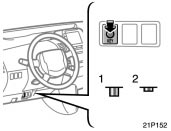
1. Smart function is on.
2. Smart function is off.
The cancel switch for this function islocated at the bottom of the instrumentpanel on the driver side. When youpush the switch, the smart function willbe deactivated. Pushing the switchagain will reactivate the function.
When the smart function is deactivated,use a mechanical key or wireless remotecontrol function key to lock and unlock thedoors. To start the hybrid system, inserta smart key into the key slot.
If you do not intend to drive your vehiclefor a long time, push the cancel switch todeactivate the smart function.
INFORMATION
The smart function will be deactivatedin the following cases:
- The cancel switch is turned on.
- The smart key is inserted into thekey slot.
- The battery of the smart key is discharged.
CAUTION
Changes or modifications not expresslyapproved by the party responsiblefor compliance could void theuser’s authority to operate the equipment.
Wireless remote control

1. Lock switch
2. Indicator light
3. Unlock switch
4. Panic switch
The wireless remote control system isdesigned to lock or unlock all the sidedoors and back door, or activate thetheft deterrent system from a distancewithin approximately 1 m (3 ft.) of thevehicle.
When you operate any switch, push itslowly and securely. At this time, the indicatorlight flashes once.
The wireless remote control key is anelectronic component. Observe the followinginstructions in order not to cause damageto the key.
- Do not leave the key in places wherethe temperature becomes high such ason the dashboard.
- Do not disassemble it.
- Avoid knocking it hard against otherobjects or dropping it.
- Avoid putting it in water.
If your vehicle is equipped with smartentry and start system, you can use upto 5 master keys for the same vehicle. Incase of the vehicle not equipped withsmart entry and start system, up to 4master keys are available. Contact yourToyota dealer for detailed information.
If the wireless remote control key doesnot actuate the doors or alarm or operatefrom a normal distance, or indicator lighton the key is dimmed or does not comeon:
- Check for closeness to a radio transmittersuch as a radio station or anairport which can interfere with normaloperation of the key.
- The battery may have been consumed.Check the battery in the key. To replacethe battery, see “—Replacing battery”on page 38.
If you lose your key, contact your Toyotadealer as soon as possible to avoid thepossibility of theft, or an accident. (See “Ifyou lose your keys” on page 379.)
Locking and unlockingdoors

Locking operation

Unlocking operation
To lock and unlock all the doors, pushthe switches slowly and securely.
To lock: Push the lock switch. All the sidedoors and back door are locked simultaneously.At this time, the turn signal lightswill flash once.
Check to see that the doors are securelylocked.
If any of the doors is not securely closedor if the key is in the key slot, lockingcannot be performed by the lock switch.At this time, a beep will sound for 10seconds on the vehicle with smart entryand smart system. However, if the key isin the key slot, a beep will not sound. Tostop the beep, close all the side doorsand back door securely or push the unlockswitch.
The buzzer can be disabled. For details,contact your Toyota dealer.
To unlock: Push the unlock switch once tounlock the driver’s door alone. Pushingthe switch twice within 3 seconds unlocksall the doors simultaneously. Each timethe unlock switch is pushed, the turn signallights will flash twice.
This double switch operation to unlock allthe side doors and back door can bechanged to a single switch operation. Fordetails, contact your Toyota dealer.
When the unlock switch is pressed theinterior light comes on. The light remainson for about 15 seconds unless any of thedoors is opened and then closed. (Forfurther information, see “Interior lights” onpage 115.)
You have 30 seconds to open a door afterusing the wireless remote unlock feature.If a door is not opened by then, all thedoors will be automatically locked again.
The timing for the automatic door lockfunction can be changed. For details, contactyour Toyota dealer.
If the lock or unlock switch is keptpressed in, the locking or unlocking operationis not repeated. Release the switchand then push it again.
The following adjustments can be made inthis system. For details, contact yourToyota dealer:
- Canceling the wireless door locking orunlocking function
- Canceling the flash of the turn signal
Activating panic mode

Pushing the panic switch for 1 secondblows the horn intermittently andflashes the headlights, tail lights andemergency flashers and turns on theinterior light.
The panic switch is used to deter vehicletheft when you witness anyone attemptingto break into or damage your vehicle.
The alarm will last for one minute. To stopthe alarm midway, do the follows:
- Push any switch on the key.
- Put the hybrid system in the “IG−ON”mode.
The panic mode does not work in “IG−ON”mode.
The alarm function can be activated ordeactivated. For details, contact yourToyota dealer.
CAUTION
Changes or modifications not expresslyapproved by the party responsiblefor compliance could void theuser’s authority to operate the equipment.
Replacing battery
For replacement, use a CR2032 lithiumbattery or equivalent and a special screwdriver.
CAUTION
Special care should be taken thatsmall children do not swallow the removedbattery or components.
NOTICE
- When replacing the battery, be carefulnot to lose the components.
- Replace only with the same orequivalent type recommended by aToyota dealer.
- Dispose of used batteries accordingto the local laws.
Replace the battery by following procedures.

1. Remove the mechanical key and coverwith slide the lock knob in the arrowdirection.

2. Remove the 4 screws to take out thelid of the module.
NOTICE
Do not bend the terminals.
3. Remove the discharged battery and putin a new battery with positive (+) sideup.
NOTICE
- Make sure the positive side andnegative side of the battery arefaced correctly.
- Do not replace the battery with wethands. Water may cause unexpectedrust.
- Do not touch or move any componentsinside the transmitter, or itmay interfere with proper operation.
- Be careful not to bend the electrodewhen inserting the battery and thatdust or oils do not adhere to thecase.
4. Install the lid with the 4 screws.
NOTICE
Take care not to damage or bend theO−ring when installing.
5. Replace the mechanical key and coverwith slide the lock knob.
After replacing the battery, check that thekey operates properly. If the key still doesnot operate properly, contact your Toyotadealer.
Side doors
LOCKING AND UNLOCKING THE DRIVER’SDOOR WITH MECHANICAL KEY

Insert the mechanical key into the keyholeand turn it.
To lock: Turn the knob forward.
To unlock: Turn the knob backward.
The alarm sounds when you unlock thedoor using a key with the theft deterrentsystem set. For details, see “Theft deterrentsystem” on page 46.
LOCKING AND UNLOCKING WITH INSIDELOCK KNOB

Move the lock knob.
To lock: Push the knob forward.
To unlock: Pull the knob backward.
The driver’s door can be opened by pullingthe inside door handle even if the lockknob is depressed.
Closing the door with the lock knob in thelock position will also lock the door. Becareful not to lock your keys in the vehicle.The driver’s door cannot be locked if youleave the key in the key slot.

Driver’s side

Front passenger’s side
LOCKING AND UNLOCKING WITHPOWER DOOR LOCK SWITCH
Push the switch.
To lock: Push the switch down on thefront side.
To unlock: Push the switch down on therear side.
All the doors lock or unlock simultaneously.
REAR DOOR CHILD−PROTECTORS

Move the lock lever to the “LOCK”position as shown on the label.
When the child−protector is locked, youcannot open the rear door by the insidedoor handle. We recommend using thisfeature whenever small children are in thevehicle.
CAUTION
Before driving, be sure that the doorsare closed and locked, especiallywhen small children are in the vehicle.Along with the proper use ofseat belts, locking the doors helpsprevent the driver and passengersfrom being thrown out from the vehiclein an accident. It also helps preventthe doors from being openedunintentionally.
Back door

To open the back door, push the backdoor opener and raise the back door.
If the back door opener does not operate,see “If you cannot operate back dooropener” on page 380.

When closing the back door, the insidehandle can be used to make the reacheasier.
See “Cargo and luggage” on page 344 forprecautions to observe when loading luggage.
To close the back door, lower it and pressdown on it. After closing the back door,try pulling it up to make sure it is securelyclosed.
CAUTION
Keep the back door closed while driving.This not only keeps the luggagefrom being thrown out, but also preventsexhaust gases from enteringthe vehicle.
If the 12 volt battery is disconnected orrun down, the back door will be automaticallylocked and the back door systemmay not work after you reconnect, replaceor recharge the 12 volt battery. In any ofthese cases, normalize the back door systemby following procedure.
1. Unlock the back door with the remotecontrol key or power door lock switch.
2. Close the back door completely byhand.
If the back door system does not operateproperly after the above procedure, theremay be a problem in the system. Contactyour Toyota dealer.
Power windows

The windows can be operated with theswitch on each door.
The power windows work when the “IG−ON” mode is enabled.
Key off operation: If both front doors areclosed, they work for 43 seconds evenafter the hybrid system is stopped. Theystop working when either front door isopened.
OPERATING THE DRIVER’S WINDOW
Use the switch on the driver’s door.
Normal operation: The window moves aslong as you hold the switch.
To open: Lightly push down the switch.
To close: Lightly pull up the switch.

Automatic operation: Push the switchcompletely down or pull it completely up,and then release it. The window will fullyopen or close. To stop the window partway,lightly move the switch in the oppositedirection and then release it.
Jam protection function: If somethinggets caught between the window and windowframe during automatic closing operationor key off closing operation, the windowstops and opens halfway.
If the window receives a strong impact,this function may work even if nothing iscaught.
If the 12 volt battery is disconnected orrun down, the power window may notoperate automatically and the jam protectionfunction will not function correctly afteryou reconnect, replace or recharge the12 volt battery. In any of these cases, youshould normalize the power window.
To normalize the power window:
1. Push down the power window switchand lower the window halfway.
2. Pull up the switch until the windowcloses and hold the switch for a second.
Make sure that the window opens andcloses automatically. If the power windowcannot be operated properly, have itchecked by your Toyota dealer.
CAUTION
Never try jamming any part of yourbody to activate the jam protectionfunction intentionally, as it could resultin death or serious injury.
The jam protection function maynot work if something gets caughtjust before the window is fullyclosed.
OPERATING THE PASSENGERS’WINDOWS

Use the switch on each passenger’sdoor or the switches on the driver’sdoor that control each passengers’ window.
The window moves as long as you holdthe switch.
To open: Push down the switch.
To close: Pull up the switch.
If you push in the window lock switch onthe driver’s door, the passengers’ windowscannot be operated.

CAUTION
To avoid death or serious injury, youmust do the following.
- Before you close the power windows,always make sure there isnobody around the power windows.You must also make sure theheads, hands and other parts of thebodies of all occupants are keptcompletely inside the vehicle. Ifsomeone’s neck, head or hands getcaught in a closing window, itcould result in death or serious injury.
- When anyone closes the powerwindows, make sure that he or sheoperates the windows safely.When small children are in the vehicle,never let them use the powerwindow switches without supervision.Use the window lock switch toprevent them from making unexpecteduse of the switches.
- Turn the hybrid system “OFF” andtake the key with you, when youleave your vehicle.
- Never leave anyone (particularly asmall child) alone in your vehicle, especiallywith the key still inserted orwith the hybrid system other than“OFF”. Otherwise, he/she could usethe power window switches and gettrapped in a window. Unattended person(particularly a small child) canbe involved in a serious accident.
Hood

To open the hood:
1. Pull the hood lock release lever. Thehood will spring up slightly.
CAUTION
Before driving, be sure that the hoodis closed and securely locked. Otherwise,the hood may open unexpectedlywhile driving and an accident mayoccur.
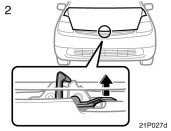
2. In front of the vehicle, pull up theauxiliary catch lever and lift thehood.

3. Hold the hood open by inserting thesupport rod into the slot.
Before closing the hood, check to see thatyou have not forgotten any tools, rags,etc. and return the support rod to itsclip—this prevents rattles. Then lower thehood and make sure it locks into place.If necessary, press down gently on thefront edge to lock it.
CAUTION
After inserting the support rod intothe slot, make sure the rod supportsthe hood securely from falling downon to your head or body.
NOTICE
Be sure to return the support rod toits clip before closing the hood. Closingthe hood with the support rodinserted into the slot could cause thehood to bend.
Theft deterrent system
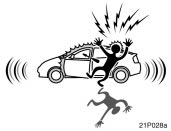
To deter vehicle theft, the system isdesigned to sound an alarm if any ofthe doors or hood is forcibly unlockedor the battery terminal is reconnectedwhen the vehicle is locked.
The alarm blows the horn intermittentlyand flashes the headlights and tail lightsand other exterior lights.
This function can be deactivated or activated.For details, contact your Toyotadealer.
SETTING THE SYSTEM
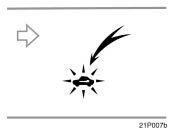
When the key is inserted into the keyslot:
1. Remove the key.
In case of the smart entry and startsystem:
1. Stop the hybrid system and open thedriver’s door.
The indicator light will start flashing. (See“Hybrid vehicle immobilizer system” onpage 21 for details.)
2. Have all passengers get out of thevehicle.
3. Close and lock all the doors and hood.The indicator light will come on when allthe doors and hood are closed andlocked.
The system will automatically be set after30 seconds. When the system is set, theindicator light will start flashing again.
4. After making sure the indicator lightstarts flashing, you may leave the vehicle.
Never leave anyone in the vehicle whenyou set the system, because unlockingfrom the inside will activate the system.
WHEN THE SYSTEM IS SET
Activating the system
The system will sound the alarm underthe following conditions:
- If any of the doors is unlocked or ifthe hood is forcibly opened without themechanical key, wireless remote controltransmitter or smart function.
- If the battery terminal is disconnectedand then reconnected.
The indicator light will come on when thesystem is activated.
If any of the doors are unlocked withoutthe mechanical key, wireless remote controltransmitter or smart function and thekey is not in the key slot, all the doorswill be automatically locked again.
After 1 minute, the alarm will automaticallystop and the indicator light will startsflashing again.
Reactivating the alarm
Once set, the system automatically resetsthe alarm after the alarm stops.
The alarm will activate again under thesame circumstances described in“Activating the system”.
Stopping the alarm
The alarm will be stopped by the followingtwo ways:
- Turn the hybrid system to “IG−ON”.
- Unlock any of the doors with the mechanicalkey, wireless remote controltransmitter or smart function.
If the 12 volt battery becomes dischargeddue to the vehicle being unused for a longtime, etc., when the battery is rechargedor replaced, the system will sound thealarm. If this happens, immediately stopthe alarm.
CANCELING THE SYSTEM
The system will be cancelled by theabove mentioned two ways.
If the tail lights come on for 2 seconds,the theft deterrent system has beenalarmed. Check to see if there is anyabnormality on your vehicle.
TESTING THE SYSTEM
1. Open all the windows.
2. Set the system as described above.The doors should be locked with themechanical key, wireless remote controltransmitter or smart function. Be sureto wait until the indicator light goes offor starts flashing.
3. Unlock any door from the inside. Thesystem should activate the alarm.
4. Stop the alarm as described above.
5. Repeat this operation for the otherdoors and hood. When testing the backdoor, also check that the system isactivated when the 12 volt battery terminalis disconnected and then reconnected.When testing the hood, releasethe lock with the hood lock releaselever and raise the hood.
If the system does not work properly,have it checked by your Toyota dealer.
Fuel tank cap

This indicates that the fuel filler dooris on the left side of your vehicle.

1. To open the fuel filler door, pull thelever up.
When refueling, turn off the hybridsystem.
CAUTION
- Do not smoke, cause spark or allowopen flames when refueling. Thefumes are flammable.
- When opening the cap, do not removethe cap quickly. In hot weather,fuel under pressure could causeinjury by spraying out the fillerneck if the cap is suddenly removed.
- Do not fuel additionally after initialauto−stop filling up, or fuel maysplash out.

2. To remove the fuel tank cap, turnthe cap counterclockwise by 90 degrees(to the pressure point 1), andthen turn it a additional 30 degrees(to point 2). Pause slightly beforeremoving it.
It is not unusual to hear a slight swooshwhen the cap is opened.

3. The removed cap can be stored onthe back side of the fuel filler door.
Position the cap so that the hooks pointto the left and right, and set it in thereceptacle on the back side of the door.
When installing the cap, turn the capclockwise until you hear a click. Whenyou hear the click, the cap is fullyclosed.
If the cap is not tightened securely, themalfunction indicator lamp comes on.Make sure the cap is tightened securely.
The indicator lamp goes off after drivingseveral times. If the indicator lamp doesnot go off, contact your Toyota dealer assoon as possible.
CAUTION
Make sure the cap is installed securelyto prevent fuel spillage inthe event of an accident.
Use only a genuine Toyota fuel tankcap for replacement. It is designedto regulate fuel tank pressure.
NOTICE
To prevent damage to the cap, applyforce only in the turning direction tothe cap. Do not pull or pry it.
Download Manual