Air conditioning system
Controls
Type 1
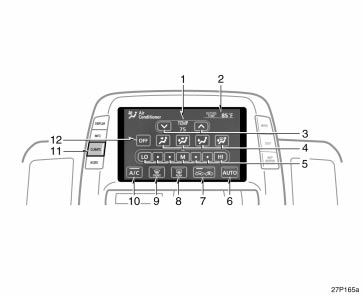
1. Passenger compartment temperaturedisplay
2. Outside temperature display
3. Temperature control switches
4. Air flow control switches
5. Fan speed control switches
6. Automatic control switch
7. Air intake control switch
8. Rear window and outside rear viewmirror defogger switch (See page 118for details.)
9. Windshield air flow switch
10. Air conditioning on−off switch
11. Air conditioning operation screen displaybutton
12. “OFF” switch
In this manual, English version screensare shown as an example.
Type 2

1. Passenger compartment temperaturedisplay
2. Outside temperature display
3. Temperature control switches
4. Air flow control switches
5. Fan speed control switches
6. Automatic control switch
7. Air intake control switch
8. Rear window and outside rear viewmirror defogger switch (See page 118for details.)
9. Windshield air flow switch
10. Air conditioning on−off switch
11. “OFF” switch
12. Air conditioning operation screen displaybutton
In this manual, English version screensare shown as an example.
Type 3

1. Outside temperature display
2. Passenger compartment temperaturedisplay
3. Air flow control switches
4. Fan speed control switches
5. Temperature control switches
6. “OFF” switch
7. Automatic control switch
8. Rear window and outside rear viewmirror defogger switch (See page 118for details.)
9. Windshield air flow switch
10. Air intake control switch
11. Air conditioning operation screen displaybutton
12. Air conditioning on−off switch
In this manual, English version screensare shown as an example.
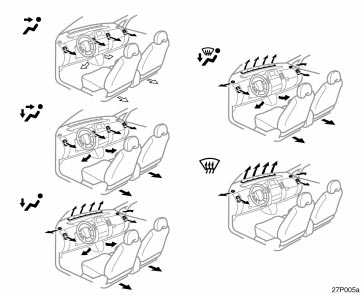
Air flow selection
In the beginning of the automatic air flow mode, air might be delivered.
The automatic air conditioning automaticallymaintains the set temperature.
This air conditioning features automaticfan speed and air flow control which automaticallyselects the most suitable fanspeed and air flow to control the temperature.The hybrid system must be in the“IG−ON” mode.
CLIMATE: Push this button to displayswitches for automatic air conditioningcontrols.
NOTICE
To prevent the battery from being discharged,do not leave the air conditioningon longer than necessarywhen the hybrid system is not operating.
(a) Climate control

Type 1 and Type 2

Type 3
SETTING OPERATION—automatic control
1. Touch the “AUTO” switch.
The indicator located in the instrumentcluster will come on.
Air conditioning is turned on if not operated.
Air flow quantity, switching of the diffusers,and switching of the air intake betweenRECIRCULATED AIR and OUTSIDEAIR are automatically adjusted. The operationstatus is shown by each indicator.
However, if the RECIRCULATED AIRmode is selected manually, controlchanges to give priority to manual settings.
When one of the manual control buttonsis depressed while operating in automaticmode, the mode relevant to the depressedbutton is set. Other conditions continue tobe adjusted automatically. However, operatingthe air flow outlets or fan speed willturn off the automatic control.
Touch the “OFF” switch to turn the airconditioning off.

Type 1 and Type 2

Type 3
2. Use the “TEMP” switch to set thedesired temperature.
The temperature of air delivered to thepassenger compartment will be controlledautomatically according to the setting.
SETTING OPERATION—manual control
When one of the manual controlswitches is touched while operating inautomatic mode, the mode relevant tothe touched switch is set. Other conditionscontinue to be adjusted automatically.
If manual air flow selection is desired—

Type 1 and Type 2

Type 3
The outlets from which air is deliveredcan be selected manually by touching theswitch. The function of each mode is asfollows:
1. Panel—Air flows mainly from theinstrument panel vents.
2. Bi−level—Air flows from both the floorvents and the instrument panel vents.
3. Floor—Air flows mainly from the floorvents.
4. Floor/Windshield—Air flows mainlyfrom the floor vents and windshieldvents.
The selected mode is highlighted in green.
If quick heating or cooling is desired—

Type 1 and Type 2

Type 3
Touch the “TEMP” switches and hold eitherone until the maximum figure or minimumfigure appears.
If manual fan speed control is desired—

Type 1 and Type 2

Type 3
1. Fan speed at low
2. Fan speed at high
The fan speed can be set to your desiredspeed by touching the appropriate air flowcontrol switch. The higher the fan speedis, the more air is delivered. Touching the“OFF” switch turns off the fan.
To remove exterior windshield frost, use thehigh speed setting.
The selected mode is highlighted in green.
If manual switching of air intake is desired—

Type 1 and Type 2

Type 3
The air intake control switch is used toswitch the air intake between the OUTSIDEAIR mode and RECIRCULATED AIRmode.
With the switch in the OUTSIDE AIRmode, the system will take fresh outsideair into the vehicle.
If quick circulation of cooled air is desired,touch the air intake control switchfor RECIRCULATED AIR.
The indicator will come on in the instrumentcluster while the RECIRCULATEDAIR mode is selected.
If recirculated air is used during heating,the windows will fog up more easily.If the hybrid system is turned off in theOUTSIDE AIR mode, the automatic controlof the air intake is activated when thehybrid system is turned on again.
2−way air intake control
To improve fuel economy, OUTSIDE AIRmode control changes when the air intakeselector is set in OUTSIDE AIR onthe following conditions:
When the maximum heating is neededwith the air flow in “Floor” or “Floor/Windshield”, fresh air flows in the uppercompartment, while air is recirculatedin the lower compartment.
When cooling is needed, both freshand recirculate modes turns on.
If manual on−off of the air conditioningis desired—
Touch the “A/C” switch to turn the airconditioning on and touch it again to turnthe air conditioning off.
If the system is used for ventilation, heatingin dry weather or removing frost orexterior fog on the windshield, turn the airconditioning off once it is no longer required.This will improve fuel economy.
The air conditioning can be used for year−round automatic temperature control includingcooling and dehumidifying operation.
(b) Windshield defogging anddefrosting

Type 1 and Type 2

Type 3
To remove interior fog on the windshield—
Touch the windshield air flow switch.
To remove frost or exterior fog on thewindshield—
1. Touch the upper side of the temperaturecontrol switch until maximum figureappears on the temperature display.
2. Touch the windshield air flow switch.
3. Push the “HI” of the air flow controlswitch to obtain a maximum air flow.
4. Leave the air conditioning on−off buttonoff.
When the windshield air flow switch istouched, the air conditioning is set to operateand the OUTSIDE AIR mode is set.
If you touch the windshield air flow switchonce again while in the windshield air flowmode, the mode then returns to the lastmode used.
The indicator will come on in the instrumentcluster while the windshield air flowmode is on.
CAUTION
Do not use the windshield air flowswitch during cooled air operation inextremely humid weather. The differencebetween the temperature of theoutside air and that of the windshieldcould cause the outer surface of thewindshield to fog up blocking yourvision.
(c) Operating tips

- The light sensor is located on the driver’sside edge of the instrument panel.If you put anything on this area orcover the area, the sensor functionmay be adversely affected.
- To cool off your Toyota after it hasbeen parked in the hot sun, drive withthe windows open for a few minutes.This vents the hot air, allowing the airconditioning to cool the interior morequickly.
- Make sure the air intake grilles in frontof the windshield are not blocked (byleaves or snow, for example).
- On humid days, do not blow cold airon the windshield. The windshield couldfog up because of the difference in airtemperature on the inside and outsideof the windshield.
- Keep the area under the front seatsclear to allow air to circulate throughoutthe vehicle.
- On cold days, set the fan speed tohigh for a minute to help clear theintake ducts of snow or moisture. Thiscan reduce the amount of fogging onthe windows.
- When driving on dusty roads, close allwindows. If dust thrown up by the vehicleis still drawn into the vehicle afterclosing the windows, it is recommendedthat the air intake selector be set toOUTSIDE AIR and the fan speed selectorto any setting except “OFF”.
- If following another vehicle on a dustyroad, or driving in windy and dustyconditions, it is recommended that theair intake selector be temporarily set toRECIRCULATE, which will close off theoutside passage and prevent outsideair and dust from entering the vehicleinterior.
Climate remote control

The switches are installed on both sidesof the steering pad.
“A/C AUTO” switch: Use this switch toturn on the automatic mode. (For details,see page 292.) Pressing this switch in theautomatic control turns the blower off.
“ TEMP ” switch: Use this switch toset the desired temperature. (For details,see page 293.)
“ ” switch: Use this switch to changethe air intake mode. (For details, seepage 296.)
“ ” switch: Use this switch to removeinterior fog on the windshield. (For details,see page 297.)
“ ” switch: Use this switch to turn onor off the rear window and outside rearview mirror defoggers. (For details, seepage 118.)
CAUTION
Operate the switches with due carewhile you are driving to avoid accidents.
Instrument panel ventss

If air flow control is not satisfactory, checkthe instrument panel vents. The instrumentpanel vents may be opened or closed asshown.
Air conditioning filter

The air conditioning filter informationlabel is placed on the left side of theglove box as shown and indicates thata filter has been installed.
The air conditioning filter prevents dustfrom entering the vehicle through the airconditioning vent.

The air conditioning filter is set behindthe glove box.
Checking and replacing theair conditioning filter
The air conditioning filter may clog afterlong use. The filter may need to bereplaced if the air flow of the air conditioningand heater experiences extremereductions in operating efficiency, or ifthe windows begin to fog up easily.
To maintain the air conditioning efficiency,inspect and replace the air conditioningfilter according to the maintenance schedule.In dusty areas or areas with heavytraffic flow, such as inner city or desertareas, early replacement may be required.(For scheduled maintenance information,please refer to the “Owner’s Manual Supplement/Scheduled Maintenance”.)

1. Open the glove box, and slide offthe damper as shown.

2. Push in each side of the glove boxto disconnect the claws.

3. Pull the filter case toward you totake it out.

4. Remove the filter from the filter caseand replace it with a new one.
5. Install the filter and filter case in thereverse order of removal.
When setting the filter to the filter case,ensure that the flat side of the filter isdown and the ribbed side is up.
Position the filter case so that the “ UP”mark is pointing up and install it in thevehicle.
INFORMATION
The air filter should be installed properlyin position. The use of air conditioningwith the air filter removedmay cause deteriorated dustproof performanceand then affect air conditioningperformance.
Download Manual