Disclaimer: Not affiliated with or endorsed by Subaru Motor Company. For informational purposes only. Full Disclaimer

2021 Subaru Forester Owners Manual - Seats


Seats

! Safety tips for head restraint

! Forward and backward adjustment
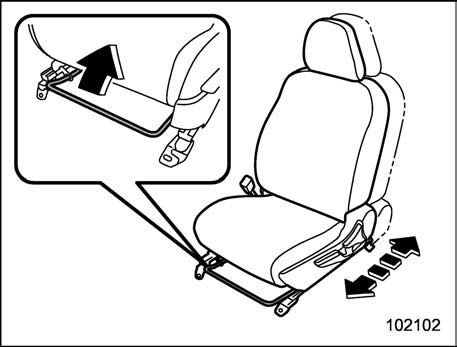
Pull the lever upward and slide the seat to the desired position. Then release the lever and move the seat back and forth to make sure that it is securely locked into place.
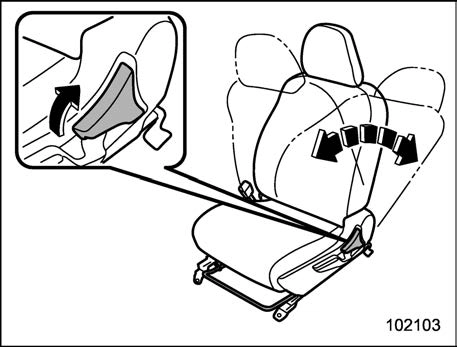
Pull the reclining lever up and adjust the seatback to the desired position. Then release the lever and make sure the seatback is securely locked into place.

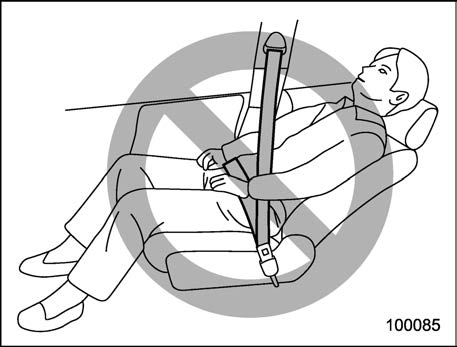
The seatback placed in a reclined position can spring back upward with force when the lever is pulled. When operating the lever to return the seatback, hold the seatback lightly so that it may be raised back gradually.
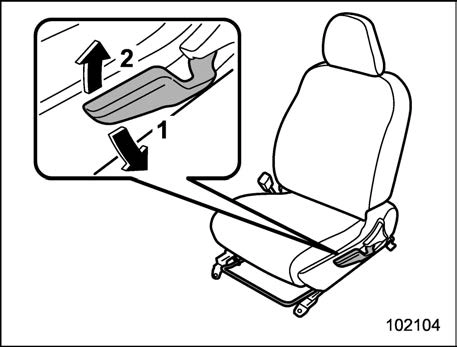
    When the lever is pushed down, the seat is lowered.
    When the lever is pulled up, the seat rises.

The height of the seat can be adjusted by moving the seat adjustment lever up and down.
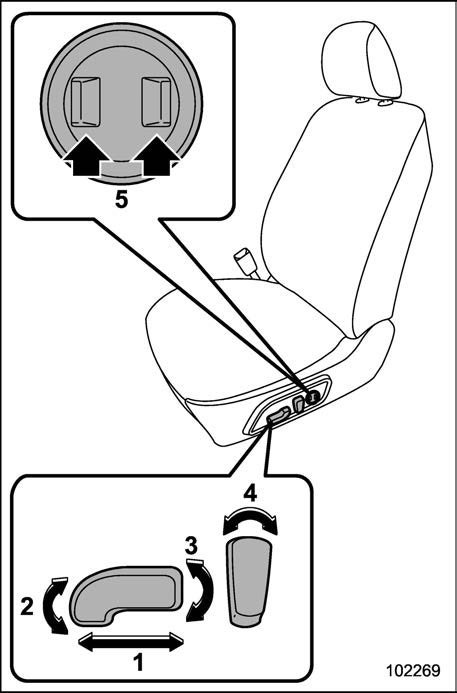
    Seat position forward/backward con- trol switch

To adjust the seat forward or backward, move the control switch forward or

backward. During forward/backward ad- justment of the seat, the seat cushion angle or height cannot be adjusted.

    Seat cushion angle control switch

To adjust the seat cushion angle, pull up or push down the front end of the control switch.

    Seat height control switch

To adjust the seat height, pull up or push down the rear end of the control switch.

    Seatback angle (reclining) control switch

To adjust the angle of the seatback, move the control switch.

    Lumbar support control switch

To increase lower back support, push the front side of the switch. To decrease lower back support, push the rear side of the switch.
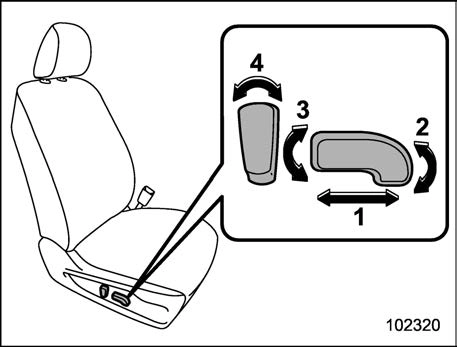
    Seat position forward/backward con- trol switch

To adjust the seat forward or backward, move the control switch forward or backward.

    Seat cushion angle control switch

To adjust the seat cushion angle, pull up or push down the front end of the control switch.

    Seat height control switch

To adjust the seat height, pull up or push down the rear end of the control switch.

    Seatback angle (reclining) control switch

To adjust the angle of the seatback, move the control switch.

Some seat positions can be registered. Register the seat position with button “1” or “2” or each of the key fobs and retrieve the seat position.

The following seat positions can be regis- tered.

    Forward/backward position of the seat
    Angle of the seatback
    Angle of the seat cushion
    Height of the seat
    Angle of the outside mirrors
    Angle of the outside mirrors when the reverse tilt-down operates.

System settings. Refer to “Driver Mon- itoring System settings”  P221.

! Registration of memory position with button “1” or “2”
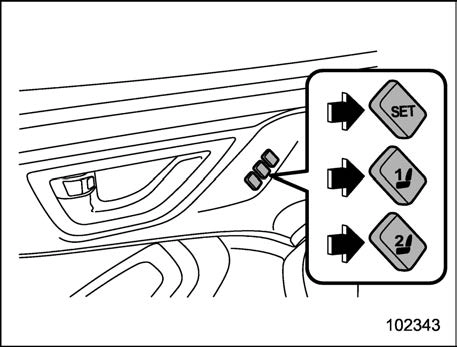
    Adjust the seat position under the following conditions.
    The parking brake is applied.
    The ignition switch is in the “ON” position.
    The select lever is in the “P” position.

    Press and hold the “SET” button, then press button “1” or “2” to register the seat position and outside mirror angle.

A chirp will sound once, and the seat position is registered.

! Registration of the reverse tilt- down mirror angle with button “1” or “2”

    Move the select lever to the “R” position, then the outside mirror angle will move to the reverse tilt-down position.
    Adjust the outside mirror angle. For details about the settings, refer to “Remote control mirror switch”  P256.
    Move the select lever to the “P” position, then the outside mirror angle will return to its original position.
    Press and hold the “SET” button, then press button “1” or “2” to register the seat position.

A chirp will sound once, and the outside mirror angle will be registered.

! Registration of memory position with a key fob
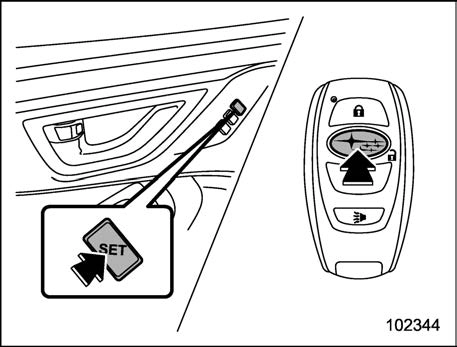
    Adjust the seat position under the following conditions.
    The parking brake is applied.
    The ignition switch is in the “LOCK”/ “OFF” position.
    The select lever is in the “P” position.

    Hold the access key fob and press and

hold the “SET” button, then press the “ ” button of the access key fob.

A chirp will sound once, and the seat position is registered.

! Registration of the reverse tilt- down mirror angle with the key fob

    Move the select lever to the “R” position, then the outside mirror angle will move to the reverse tilt-down position.
    Adjust the outside mirror angle. For details about the settings, refer to “Remote control mirror switch”  P256.
    Move the select lever to the “P” position, then the outside mirror angle will return to its original position.
    Turn the ignition switch to the “OFF”/

“LOCK” position.

    Hold the access key fob and press and hold the “SET” button, then press the “ ” button of the access key fob.

A chirp will sound once, and the reverse tilt-down mirror angle will be registered.

    The factory setting (default setting) for this function is set as the front passenger’s side mirror. The setting of the right and left side mirror/front passenger’s side mirror operation can be changed by a SUBARU dealer. Contact your SUBARU dealer for de- tails.
    The system stores the adjusted mirror angle for approximately 45 sec- onds after the ignition switch is turned to the “OFF” position. Register the mirror angle while the memory function is available.

! Retrieval of memory position registered with button “1” or “2”
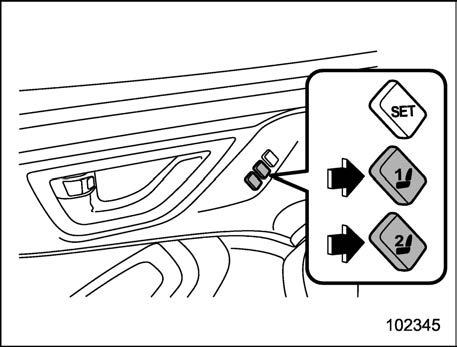
    Turn the ignition switch to the “ON” position.
    Put the select lever is in the “P” position and apply the parking brake, then press button “1” or “2”.

A chirp will sound and the seat and outside mirror move to the registered position.

When the select lever is moved to the “R” position, the outside mirror will move to the registered reverse tilt-down position.

    If the vehicle battery is removed, the registered memory position data will not be deleted.
    When the button “1” or “2” is pressed within 45 seconds after the driver’s door is opened, the registered memory position can be retrieved even if the ignition switch is in the “LOCK” or “OFF” position.
    If buttons “1” and “2” are pressed at the same time, execution of seat posi- tion retrieval may not be possible.
    When the retrieved position is the same as the current seat position, a chirp will sound twice.

! Retrieval of the memory position registered with access key fob
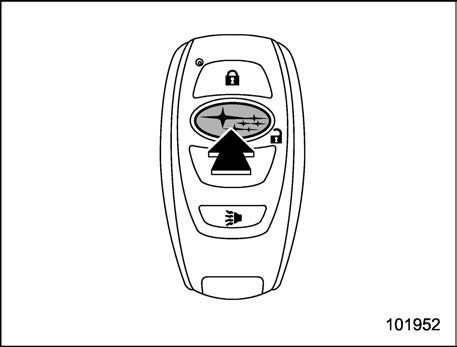
    Hold the registered access key fob.

    Unlock the driver’s door by pressing the “ ” button or touching the sensor behind the door handle.
    Open the driver’s door.

A chirp will sound and the seat and angle of the outside mirrors moves to the registered position.

When the select lever is moved to the “R” position, the outside mirror will move to the registered reverse tilt-down position.

    A retrieved seat position might de- viate if you attempt to continue operat- ing the registered seat in the same direction when the registered seat is already at the farthest possible point of adjustment in any direction.
    If the registered memory position cannot be retrieved after performing the previous procedures, try the follow- ing procedures.
    Press the “SET” button on the driver’s door.
    Press the “ ” button on the access key fob or the door lock button to lock the doors.
    Perform the prior procedures again.
    If the keyless access function is disabled, the memory position cannot be retrieved by touching the sensor behind the driver’s door handle. How- ever, the memory position can still be retrieved by pressing the “” button on the access key fob. For information about how to enable/disable the key- less access function, refer to “Dis- abling keyless access function”

 P124.

    If a new position is registered for the same access key fob, the previously registered memory position data will be deleted.
    If you are carrying 2 or more access keys, seat position retrieval may not be possible.
    If, while carrying an access key, 45 seconds passed after you enter the operating range of the keyless access function, it may not be possible to retrieve the registered memory posi- tion even if the door is open. For the operating range of the keyless access function, refer to “Locking and unlock- ing by holding the access key fob”

 P118.

! Clearing the registered seat posi- tion with access key fob

    Close the driver’s door.
    Hold the access key fob and press and hold the “SET” button, then press the “ ” button on the access key fob.

A chirp will sound, and the registered seat position will be cleared.


Download Manual