Disclaimer: Not affiliated with or endorsed by RAM Motor Company. For informational purposes only. Full Disclaimer
Replacing Your Ram 2500's Brakes and Rotors
Updated:
The brake system of your Ram 2500 must be maintained for both performance and safety. Brake rotors and pads deteriorate over time, so knowing how to replace them is crucial.
With the help of this article, you can maintain your Ram 2500 in the best possible condition by learning how to replace brake pads and rotors.
1. Assemble the Equipment and Supplies Required

Before starting to change the brake pads and rotors, make sure you have the necessary tools and supplies on hand:
- Jack and jack stands to raise your car.
- A lug wrench to remove the wheels.
- Ratchet and socket set.
- A C-clamp or brake caliper tool to compress the caliper piston.
- A torque wrench to tighten bolts according to manufacturer requirements.
- Brake cleaner to remove grime and grease.
- Wire or bungee rope to hang the caliper and avoid putting stress on the brake line.
- A new set of rotors and brake pads made specifically for your Ram 2500.
Shop From Amazon


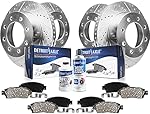
2. Get Your Ram 2500 Ready
Ensure the Ram 2500 is level and that the parking brake is applied before you start. Begin by loosening the lug nuts on the wheel you intend to work on, but do not remove them entirely just yet.
3. Raise and Secure Your Car
Carefully raise your Ram 2500 off the ground with a jack, then use jack stands to secure it. Verify that it is secure and stable before proceeding further.
4. Remove the Wheel

Once your Ram 2500 is securely raised, remove the wheel and lug nuts. You will then be able to access the brake components.
5. Remove the Caliper
Next, locate the brake caliper, which has two caliper mounting bolts holding it to the rotor. Use your ratchet and socket set to unscrew these bolts and release the caliper.
When removing the caliper, exercise caution so as not to damage the brake line. To reduce stress on the brake line, you can hang it from the suspension with wire or a bungee cord.
6. Replace the Brake Pads

With the caliper out of the way, you can access the old brake pads. Carefully remove them and observe their orientation, then align the new brake pads similarly.
Reposition the caliper piston into its housing by gently compressing it with a C-clamp or brake caliper tool. This step is necessary to make room for the larger, thicker brake pads.
Shop From Amazon


7. Remove the Rotor
After removing the old brake pads, you can remove the old rotor. A few bolts may hold the caliper bracket in place, so removing it might be necessary to achieve this.
The rotor should be able to slide off the wheel hub after the bracket is removed. If the rotor is stuck, use a rubber mallet to gently tap it and release it.
8. Install the New Rotor

Before attaching the replacement rotor, clean the wheel hub to remove any debris or rust. Slide the new rotor onto the wheel hub and use the lug nut to keep the rotor steady.
9. Reassemble the Brake System
Reattach the caliper to the rotor and the caliper bracket. Using a torque wrench, tighten the caliper mounting and bracket bolts according to the manufacturer's instructions.
10. Install the New Brake Pads
Slide the new brake pads into the caliper bracket, ensuring they match the orientation of the previous ones. Set them firmly in place.
11. Double-Check Everything
Before continuing, make sure that all bolts and parts are firmly attached. Safety is the top priority when it comes to your car's braking system.
Shop From Amazon


12. Replace the Wheel
After repositioning the wheel onto the hub, manually tighten the lug nuts. Next, use the jack to lower your Ram 2500 off the jack stands. To ensure uniform pressure once it is on the ground, tighten the lug nuts in a crisscross pattern using your lug wrench.
13. Test Your Brakes

It's crucial to test the brakes on your Ram 2500 before getting back on the road after replacing the brake pads and rotors. Perform this in a well-lit, safe area.
Gently apply the brakes after pressing the brake pedal a few times to build up pressure, ensuring they work as they should. It's common to experience diminished stopping power during the first few stops as the new brake pads and rotors break in.
14. Bed in Your New Brakes
Bedding in your new brake pads and rotors is an essential step in ensuring the best possible braking performance. This process allows the brake pads to evenly and properly coat the new rotors with friction material.
It usually involves a few slow stops from a moderate speed without stopping completely, followed by a cooling-off period to avoid overheating.
In Summary
You can change your Ram 2500's brake pads and rotors at a reasonable cost, which will improve the vehicle's performance and safety. If you follow the instructions in this article, you can confidently replace the brake components on your truck.
Always prioritize safety before checking your brakes, take your time, and ensure all parts are tightened. If you're not comfortable performing this task yourself, consider seeking professional help, as well-maintained brakes are crucial for your safety while driving.

Nick Marchenko, PhD
Industrial Engineer & Automotive Content Specialist
Nick writes in-depth guides on car clubs, engine specs, vehicle ownership, and modifications, combining engineering knowledge with automotive passion.
Full profile → LinkedIn →You May Also Like
How To Tint Windows of the RAM 2500?
2 years agoWindow tinting for the RAM 2500 is more than a mere aesthetic choice; it's a practical decision with numerous advantages. First off, it keeps the RAM 2500's interior cooler on scorching days b...
How To Prepare RAM 2500 For Towing
2 years agoYour RAM 2500 is a powerhouse on and off the road. It's engineered not just for easy commutes or hauling your shopping home. Your RAM 2500 is built to tow, whether it's a sizable camper or ano...
How To Decode RAM 2500 VIN For Free?
2 years agoEach RAM 2500 comes equipped with its own distinct Vehicle Identification Number (VIN), a crucial sequence of characters encoding vital information about the truck. The VIN divulges details such as th...
The RAM 2500 Overview - Trim Levels Comparison
2 years agoThe RAM 2500, a titan in the truck realm since its debut in 2012, rolls into 2022 still flexing its muscular charm across various trims and configurations, tailored for everything from the daily grind...