Mirrors
Inside rearview mirror
Adjust the rearview mirror so that the center view through the rear window is seen. Make this adjustment before you start driving.
WARNING - Rear visibility
Do not place objects in the rear seat or cargo area which would interfere with your vision through the rear window.
WARNING
Do not adjust the rearview mirror while the vehicle is moving. This could result in loss of control, and an accident which could cause death, serious injury or property damage.
WARNING
Do not modify the inside mirror and don’t install a wide mirror. It could result in injury, during an accident or deployment of the air bag.
Day/night rearview mirror (if equipped)
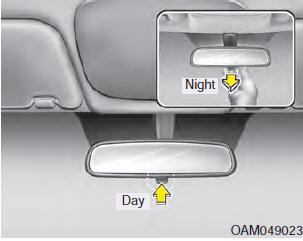 Make this adjustment
before you start driving and while the day/night lever is in the day position.
Pull the day/night lever toward you to reduce the glare from the headlights of the vehicles behind you during night driving.
Remember that you lose some rearview clarity in the night position.
Electric chromic mirror (ECM) with compass
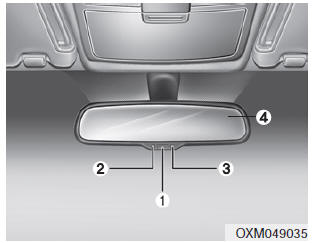
1. Feature Control Button
2. Status Indicator LED
3. Rear Light Sensor
4. Display Window
Automatic-Dimming Night Vision Safety™ (NVS®) Mirror
The NVS® Mirror in your vehicle is the most advanced way to reduce annoying glare in the rearview mirror during any driving situation. For more information regarding NVS® mirrors and other applications, please refer to the Gentex website: www.gentex.com
CAUTION
The NVS® Mirror automatically reduces glare during driving conditions based upon light levels monitored in front of the vehicle and from the rear of the vehicle. These light sensors are visible through openings in the front and rear of the mirror case.Any object that would obstruct either light sensor will degrade the automatic dimming control feature.
Automatic-dimming function
Your mirror will automatically dim upon detecting glare from the vehicles traveling behind you. The autodimming function can be controlled by pushing the ON/OFF Button:
1. Pressing the button turns the autodimming function OFF which is indicated by the green Status Indicator LED turning off.
2. Pressing the button again turns the auto-dimming function ON which is indicated by the green Status Indicator LED turning on.
✽ NOTICE
The mirror defaults to the ON position each time the vehicle is started.
Z-Nav™ Compass Display
The NVS™ Mirror in your vehicle is also equipped with a Z-Nav™ Compass that shows the vehicle Compass heading in the Display Window using the 8 basic cardinal headings (N, NE, E, SE, etc.).
Compass function
The Compass can be turned ON and OFF and will remember the last state when the ignition is cycled. To turn the display feature ON/OFF:
1. Press and release the button to turn the display feature OFF.
2. Press and release the button again to turn the display back ON.
Additional options can be set with press and hold sequences of the button and are detailed below.
There is a difference between magnetic north and true north. The compass in the mirror can compensate for this difference when it knows the Magnetic Zone in which it is operating.
This is set either by the dealer or by the user. The operating Zone Numbers for North America are shown in the figure on the following section.

To adjust the Zone setting:
1. Determine the desired Zone Number based upon your current location on the Zone Map.
2. Press and hold the button for more than 3 but less than 6 seconds, the current Zone Number will appear on the display.
3. Pressing and holding the button again will cause the numbers to increment (Note: they will repeat …13, 14, 15, 1, 2, …). Releasing the button when the desired Zone Number appears on the display will set the new Zone.
4. Within about 5 seconds the compass will start displaying a compass heading again.
There are some conditions that can cause changes to the vehicle magnets, such as installing a ski rack or a CB antenna. Body repair work on the vehicle can also cause changes to the vehicle's magnetic field. In these situations, the compass will need to be re-calibrated to quickly correct for these changes. To re-calibrate the compass:
1. Press and hold the button for more than 6 seconds. When the compass memory is cleared a "C" will appear in the display.
2. To calibrate the compass, drive the vehicle in 2 complete circles at less than 5 mph (8 km/h).
Electrochromic mirror with HomeLink system (if equipped)
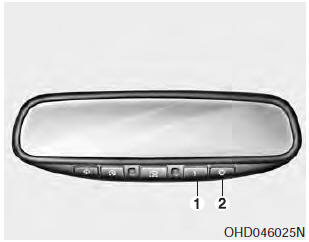
To operate the electric rearview mirror
Press the I button (1) to turn the automatic- dimming function on. The mirror indicator light will illuminate. Press the O button (2) to turn the automatic- dimming function off. The mirror indicator light will turn off.
HomeLink® Wireless Control System
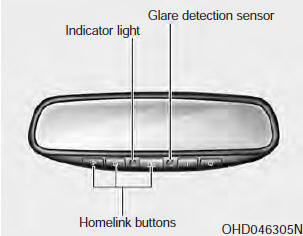
Your new mirror comes with an integrated HomeLink Universal Transceiver, which allows you to program the mirror to activate your garage door(s), estate gate, home lighting, etc. The mirror actually learns the codes from your various existing transmitters.
WARNING
- When programming the HomeLink® Wireless Control System, you may be operating a garage door or gate operator. Make sure that people and objects are out of the way of the moving door or gate to prevent potential harm or damage.
- Do not use HomeLink with any garage door opener that lacks the safety stop and reverse feature as required by federal safety standards. (This includes any garage door opener model manufactured before April 1, 1982.) A garage door opener which cannot detect an object, signaling the door to stop and reverse, does not meet current federal safety standards. Using a garage door opener without these features increases risk of serious injury or death. For more information, call 1-800-355-3515 or on the internet at www.homelink.com.
Retain the original transmitter for future programming procedures (i.e., new vehicle purchase). It is also suggested that upon the sale of the vehicle, the programmed HomeLink buttons be erased for security purposes (follow step 1 in the “Programming” portion of this text).
Programming
Your vehicle may require the ignition switch to be turned to the ACC position for programming and/or operation of HomeLink. It is also recommended that a new battery be replaced in the hand-held transmitter of the device being programmed to HomeLink for quicker training and accurate transmission of the radiofrequency.
Follow these steps to train your HomeLink mirror:
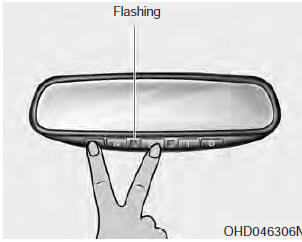
1. When programming the buttons for the first time, press and hold the left and center buttons ( ,
,
 ) simultaneously
until the indicator light begins to flash after approximately 20 seconds. (This procedure erases the factory-set default codes. Do not perform this step when programming the additional HomeLink buttons.)
✽ NOTICE
For non rolling code garage door openers, follow steps 2 - 3. For rolling code garage door openers, follow steps 2 - 6. For Canadian Programming, please follow the Canadian Programming section. For help with determining whether your garage door opener is nonrolling code or rolling code, please refer to the garage door openers owner’s manual or contact HomeLink customer service at 1- 800-355-3515.
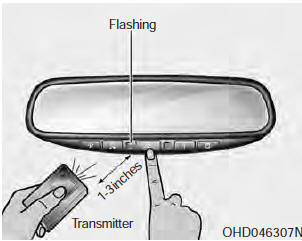
2. Press and hold the button on the HomeLink system you wish to train and the button on the transmitter while the transmitter is approximately 2-8 cm (1 to 3 inches) away from the mirror. Do not release the buttons until step 3 has been completed.
3. The HomeLink indicator light will flash, first slowly and then rapidly. When the indicator light flashes rapidly, both buttons may be released. (The rapid flashing light indicates successful programming of the new frequency signal.)
✽ NOTICE
Some gate and garage door openers may require you to replace step #3 with the “cycling” procedure noted in the “Canadian Programming” section of this document.
Rolling code programming
To train a garage door opener (or other rolling code equipped devices) with the rolling code feature, follow these instructions after completing the “Programming” portion of this text. (A second person may make the following training procedures quicker & easier.)
4. Locate the “learn” or “smart” button on the device’s motor head unit. Exact location and color of the button may vary by product brand. If there is difficulty locating the “learn” or “smart” button, reference the device’s owner’s manual or contact HomeLink at 1-800- 355-3515 or on the internet at www.homelink.com.
5. Press and release the “learn” or “smart” button on the device’s motor head unit.You have 30 seconds to complete step number 6.
6. Return to the vehicle and firmly press and release the programmed HomeLink button up to three times. The rolling code equipped device should now recognize the HomeLink signal and activate when the HomeLink button is pressed. The remaining two buttons may now be programmed if this has not previously been done. Refer to the “Programming” portion of this text.
Operating HomeLink
To operate, simply press the programmed HomeLink button.
Activation will now occur for the trained product (garage door, security system, entry door lock, estate gate, or home or office lighting). For convenience, the hand-held transmitter of the device may also be used at any time. The HomeLink Wireless Controls System (once programmed) or the original hand-held transmitter may be used to activate the device (e.g. garage door, entry door lock, etc.). In the event that there are still programming difficulties, contact HomeLink at 1-800-355-3515 or on the internet at www.homelink.com.
Erasing programmed HomeLink buttons
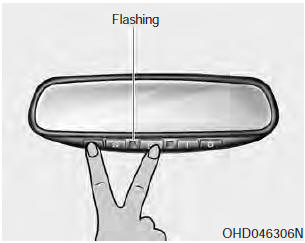
To erase the three programmed buttons (individual buttons cannot be erased):
Press and hold the left and center buttons simultaneously, until the indicator light begins to flash (approximately 20 seconds).
Release both buttons. Do not hold for longer than 30 seconds.
HomeLink is now in the train (or learning) mode and can be programmed at any time.
Reprogramming a single HomeLink button
To program a device to HomeLink using a HomeLink button previously trained, follow these steps:
1. Press and hold the desired HomeLink button. Do NOT release until step 4 has been completed.
2. When the indicator light begins to flash slowly (after 20 seconds), position the hand-held transmitter 2-8 cm (1 to 3 inches) away from the HomeLink surface.
3. Press and hold the hand-held transmitter button (or press and “cycle” - as described in “Canadian Programming”).
4. The HomeLink indicator light will flash, first slowly and then rapidly.
When the indicator light begins to flash rapidly, release both buttons.
The previous device has now been erased and the new device can be activated by pushing the HomeLink button that has just been programmed.
This procedure will not affect any other programmed HomeLink buttons.
Canadian Programming Garage & gate openers
During programming, your hand-held transmitter may automatically stop transmitting. Continue to press and hold the HomeLink button (note steps 2 through 4 in the “Programming” portion of this text) while you press and re-press (“cycle”) your handheld transmitter every two seconds until the frequency signal has been learned. The indicator light will flash slowly and then rapidly after several seconds upon successful training.
CAUTION
If programming a garage door opener or gate, it is advised to unplug the device during the “cycling” process to prevent possible motor burn-up.
Accessories
If you would like additional information on the HomeLink Wireless Control System, HomeLink compatible products, or to purchase other accessories such as the HomeLink® Lighting Package, please contact HomeLink at 1-800-355-3515 or on the internet at www.homelink.com.
FCC ID: NZLZTVHL3 IC: 4112A-ZTVHL3
This device complies with part 15 of the FCC Rules.
Operation is subject to the following two conditions:
1. This device may not cause harmful interference, and
2. This device must accept any interference received, including interference that may cause undesired operation.
WARNING
The transceiver has been tested and complies with FCC and Industry Canada rules. Changes or modifications not expressly approved by the party responsible for compliance could void the user's authority to operate the device.
Outside rearview mirror
Be sure to adjust the mirror angles before driving.
Your vehicle is equipped with both left-hand and right-hand outside rearview mirrors. The mirrors can be adjusted remotely with the remote switch. The mirror heads can be folded back to prevent damage during an automatic vehicle wash or when passing through a narrow street.
CAUTION
Do not scrape ice off the mirror face; this may damage the surface of the glass. If ice should restrict the movement of the mirror, do not force the mirror for adjustment. To remove ice, use a deicer spray, or a sponge or soft cloth with very warm water.
CAUTION
If the mirror is jammed with ice, do not adjust the mirror by force. Use an approved spray de-icer (not radiator antifreeze) to release the frozen mechanism or move the vehicle to a warm place and allow the ice to melt.
WARNING
Do not adjust or fold the outside rearview mirrors while the vehicle is moving.This could result in loss of control, and an accident which could cause death, serious injury or property damage.
Remote control
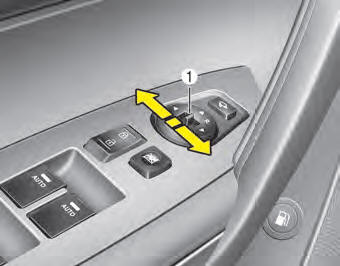
Electric type
The electric remote control mirror switch allows you to adjust the position of the left and right outside rearview mirrors. To adjust the position of either mirror the ignition switch should be in the ACC position. Move the switch (1) to R or L to select the right side mirror or the left side mirror, then press a corresponding point on the mirror adjustment control to position the selected mirror up, down, left or right.
After the adjustment, put the switch into the neutral (center) position to prevent inadvertent adjustment.
CAUTION
- The mirrors stop moving when they reach the maximum adjusting angles, but the motor continues to operate while the switch is pressed. Do not press the switch longer than necessary, the motor may be damaged.
- Do not attempt to adjust the outside rearview mirror by hand. Doing so may damage the parts.
Folding the outside rearview mirror
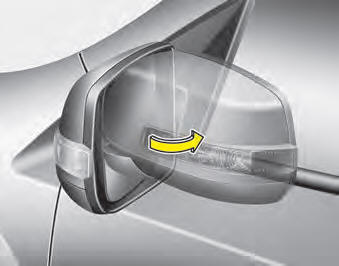
Manual type
To fold the outside rearview mirror, grasp the housing of the mirror and then fold it toward the rear of the vehicle.
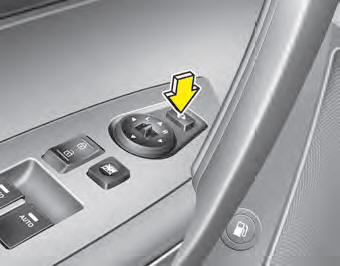
Electric type
To fold the outside rearview mirror, press the button.
To unfold it, press the button again or press the unlock button.
CAUTION
The electric type outside rearview mirror operates even though the ignition switch is in the LOCK position. However, to prevent unnecessary battery discharge, do not adjust the mirrors longer than necessary while the engine is not running.
CAUTION
In case it is an electric type outside rearview mirror, don’t fold it by hand. It could cause motor failure.
The outside rearview mirror can be folded when you press the door lock button on the smart key within 4 seconds after locking the doors by pressing the button.
The outside rearview mirror can be unfolded when you press the door unlock button on the smart key within 4 seconds after unlocking the doors by pressing the button.
Reverse parking aid function (if equipped)
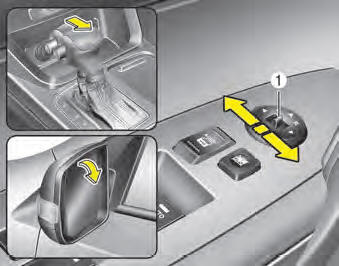
When you shift the shift lever to the R (Reverse) position, the outside rearview mirror(s) will move downward to aid reverse parking.
According to the position of the outside rearview mirror switch (1), the outside rearview mirror(s) will operate as follows:
Left or Right :
When the L or R switch is selected, both outside rearview mirrors will move downward.
Neutral :
When neither switch is selected, the outside rearview mirrors will not operate.
✽ NOTICE
The outside rearview mirrors will automatically revert to their original positions under the following conditions:
1. Engine start/stop button is turned to the ACC or OFF position.
2. Shift lever is moved to any position except R.
3. Remote control outside rearview mirror switch is not selected.
Download Manual