Bluetooth® Wireless Technology Audio
What is Bluetooth® Wireless Technology?
Bluetooth® Wireless Technology allows devices to be connected in a short distance, including hands-free devices, stereo headsets, wireless remote controllers, etc. For more information, visit the Bluetooth® Wireless Technology website at www.Bluetooth.com
Before using Bluetooth® Wireless Technology audio features
- • Bluetooth® Wireless Technology audio may not be supported depending on the compatibility of your Bluetooth® Wireless Technology mobile phone.
- • In order to use Bluetooth® Wireless Technology audio, you must first pair and connect the Bluetooth® Wireless Technology mobile phone.
- • The Bluetooth® word mark and logos are registered trademarks owned by Bluetooth SIG, Inc. and any use of such marks by Kia is under license. Other trademarks and trade names are those of their respective owners. A Bluetooth® enabled cell phone is required to use Bluetooth® Wireless Technology
WARNING
Driving while distracted can result in a loss of vehicle control that may lead to an accident, severe personal injury, and death. The driver’s primary responsibility is in the safe and legal operation of a vehicle, and use of any handheld devices, other equipment, or vehicle systems which take the driver’s eyes, attention and focus away from the safe operation of a vehicle or which are not permissible by law should never be used during operation of the vehicle.
Bluetooth® Wireless Technology audio can be used only when the [Audio Streaming] of Phone is turned 
.
❈ Setting Bluetooth® Wireless Technology Audio Streaming : Press the ![Select [Phone]](https://www.ksmanual.com/images/books/3/1/page.h414.gif) key
key ![Select [Phone]](https://www.ksmanual.com/images/books/3/1/page.h415.gif)
Select [Phone]![Select [Audio Streaming] through the](https://www.ksmanual.com/images/books/3/1/page.h416.gif)
Select [Audio Streaming] through the TUNE knob
 Set
Set 
/
Starting Bluetooth® Wireless Technology Audio
Press the
key to change the mode in order of CD➟USB➟AUX➟My Music➟BT Audio.
If BT Audio is selected, Bluetooth® Wireless Technology audio will start playing.
❈ Audio may not automatically start playing in some mobile phones.
Using the Bluetooth® Wireless Technology audio features
Play / Stop
Press the 
TUNE knob to play and pause the current song.
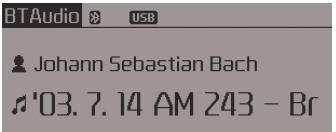
Previous / Next song Press 
or 
to play previous or next song.
❈ The previous song / next song / play / pause functions may not be supported in some mobile phones.
Phone
Before using the Bluetooth® Wireless Technology phone features
- In order to use Bluetooth® Wireless Technology phone, you must first pair and connect the Bluetooth® Wireless Technology mobile phone.
- If the mobile phone is not paired or connected, it is not possible to enter Phone mode. Once a phone is paired or connected, the guidance screen will be displayed.
- If Priority is set upon vehicle ignition (IGN/ACC ON), the Bluetooth® Wireless Technology phone will be automatically connected. Even if you are outside, the Bluetooth® Wireless Technology phone will be automatically connected once you are in the vicinity of the vehicle. If you do not want automatic Bluetooth® Wireless Technology phone connection, set the Bluetooth® Wireless Technology power to OFF
Making a call using the Steering-wheel mount controls
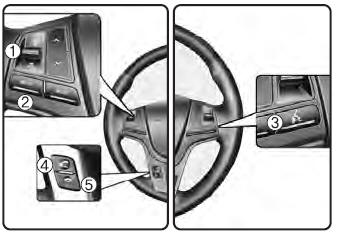
(1) VOLUME button :
Raises or lowers speaker volume.
(2) MUTE button :
Mute the microphone during a call.
(3) 
button :
Activates voice recognition.
(4) button
:
Places and transfers calls.
(5) button
:
Ends calls or cancels functions.
Check call history and making call
➀ Shortly press (under 0.8 seconds) the key on the steering
remote controller.
➁ The call history list will be displayed on the screen.
➂ Press the
key again to connect a call to the selected number.
Redialing the most recently called number
➀ Press and hold (over 0.8 seconds) the 
key on the steering remote controller.
➁ The most recently called number is redialed.
Download Manual