Information Displays
General Information - Vehicles With: 6.5 Inch Instrument Cluster Display Screen
 WARNING: Driving while distracted can result in loss of vehicle control, crash and injury. We strongly recommend that you use extreme caution when using any device that may take your focus off the road. Your primary responsibility is the safe operation of your vehicle. We recommend against the use of any hand-held device while driving and encourage the use of voice-operated systems when possible. Make sure you are aware of all applicable local laws that may affect the use of electronic devices while driving. WARNING: Driving while distracted can result in loss of vehicle control, crash and injury. We strongly recommend that you use extreme caution when using any device that may take your focus off the road. Your primary responsibility is the safe operation of your vehicle. We recommend against the use of any hand-held device while driving and encourage the use of voice-operated systems when possible. Make sure you are aware of all applicable local laws that may affect the use of electronic devices while driving. |
You can control various systems on your vehicle using the information display controls on the steering wheel.Corresponding information appears in the instrument cluster display.
Instrument Cluster Display Controls
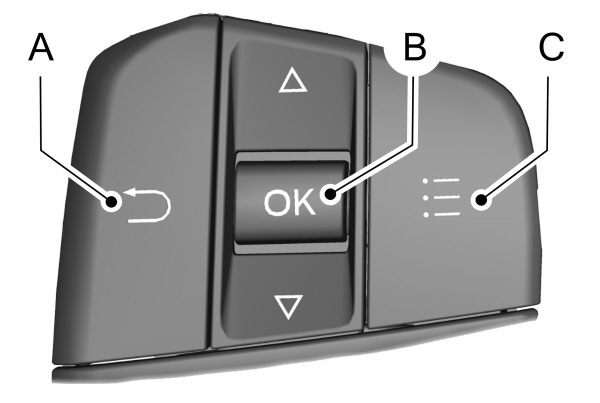
A Return button. Return button.B OK button.C Menu button. |
Return Button
Use the return button to go back or to exit.
OK Button
Use the OK button to make a selection.You can also use it to scroll through a menu.
Menu Button
Use the menu button on the main screen to display the submenu.
6 Inch Display Menu

Note: Some options may appear slightly different or not at all if the items are optional.
Note: Some MyKey menu options only appear if MyKey is enabled and at least one MyKey is programmed.
Select Screens
| Select Screens |
|---|
| Menu options covered in Personalized Settings. See Personalized Settings . |
Audio
|
Audio |
|---|
| Menu options covered in the SYNC chapter. See . |
Navigation
|
Navigation |
|---|
| Menu options covered in the SYNC chapter. See . |
Phone
|
Phone |
|---|
| Menu options covered in the SYNC chapter. See . |
Settings
| Settings | ||
|---|---|---|
|
Brake Coach |
||
|
Oil Life |
Percent Oil Life Indication XXX% Hold Ok to Reset | |
|
Tire Monitor |
Hold Ok to Reset | |
|
Neutral Tow |
Hold Ok to Initialize | |
Note: Additional vehicle settings are available through your touchscreen. See Settings .
Display Setup
| Display Setup | ||
|---|---|---|
| Speedometer units | ||
| Driving History1 | Hold Ok to Reset | |
1Hybrid only
Note: Additional display settings are available through your touchscreen. See Settings .
Hybrid Display Information (If Equipped)
Unique hybrid vehicle information displays on your instrument cluster display when you shut off your vehicle or come to a stop.
Brake Coach
Appears after the vehicle has come to a stop. It coaches you to brake in a manner that maximizes the amount of energy returned through the regenerative braking system.
The percent displayed indicates the regenerative braking efficiency, with 100% representing the maximum amount of energy recovery.
Note: While regenerative braking works in all drive modes, the brake coach display may not be available in all drive modes.
Brake coach can be turned on or off in the settings menu.
Trip Summary
Displays upon shutting off your vehicle. The values are cumulative since you last started your vehicle.
The information shown is the same as the This Trip on demand screen. See Personalized Settings .
General Information - Vehicles With: 12.3 Inch Instrument Cluster Display Screen
| WARNING: Driving while distracted can result in loss of vehicle control, crash and injury. We strongly recommend that you use extreme caution when using any device that may take your focus off the road. Your primary responsibility is the safe operation of your vehicle. We recommend against the use of any hand-held device while driving and encourage the use of voice-operated systems when possible. Make sure you are aware of all applicable local laws that may affect the use of electronic devices while driving. |
You can control various systems on your vehicle using the information display controls on the steering wheel.Corresponding information appears in the instrument cluster display.
Instrument Cluster Display Controls
| AReturn button. B OK button.C Menu button. |
Return Button
Use the return button to go back or to exit.
OK Button
Use the OK button to make a selection.You can also use it to scroll through a menu.
Menu Button
Use the menu button on the main screen to display the submenu.
12 Inch Display Menu
Note: Some options may appear slightly different or not at all if the items are optional.
Note: Some MyKey menu options only appear if MyKey is enabled and at least one MyKey is programmed.
Select Screens
| Select Screens |
|---|
| Menu options covered in Personalized Settings. See Personalized Settings . |
Audio
|
Audio |
|---|
| Menu options covered in the SYNC chapter. See . |
Navigation
|
Navigation |
|---|
| Menu options covered in the SYNC chapter. See . |
Phone
|
Phone |
|---|
| Menu options covered in the SYNC chapter. See . |
Settings
| Settings | ||
|---|---|---|
|
Brake Coach |
||
|
Oil Life |
Percent Oil Life Indication XXX% Hold Ok to Reset | |
|
Tire Monitor |
Hold Ok to Reset | |
|
Neutral Tow |
Hold Ok to Initialize | |
Note: Additional vehicle settings are available through your touchscreen. See Settings .
Display Setup
| Display Setup | ||
|---|---|---|
|
Add Tachometer to View |
||
| Speedometer units | ||
| Driving History1 | Hold Ok to Reset | |
1Hybrid only
Note: Additional display settings are available through your touchscreen. See Settings .
Hybrid Display Information (If Equipped)
Unique hybrid vehicle information displays on your instrument cluster display when you shut off your vehicle or come to a stop.
Brake Coach
Appears after the vehicle has come to a stop. It coaches you to brake in a manner that maximizes the amount of energy returned through the regenerative braking system.
The percent displayed indicates the regenerative braking efficiency, with 100% representing the maximum amount of energy recovery.
Note: While regenerative braking works in all drive modes, the brake coach display may not be available in all drive modes.
Brake coach can be turned on or off in the settings menu.
Trip Summary
Displays upon shutting off your vehicle. The values are cumulative since you last started your vehicle.
The information shown is the same as the This Trip on demand screen. See Personalized Settings .
General Information - Vehicles With: 4.2 Inch Instrument Cluster Display Screen
| WARNING: Driving while distracted can result in loss of vehicle control, crash and injury. We strongly recommend that you use extreme caution when using any device that may take your focus off the road. Your primary responsibility is the safe operation of your vehicle. We recommend against the use of any hand-held device while driving and encourage the use of voice-operated systems when possible. Make sure you are aware of all applicable local laws that may affect the use of electronic devices while driving. |
You can control various systems on your vehicle using the quick action menu (QAM) buttons on the right-hand side of the steering wheel. The information display provides the corresponding information.
Information Display Controls
| AReturn button. B OK button.C Menu button. |
Return Button
Use the return button to go back or to exit.
OK Button
Use the OK button to make a selection.You can also use it to scroll through a menu.
Menu Button
Use the menu button on the main screen to display the submenu.
4 Inch Display Menu
Note: Some options may appear different or not at all if the items are optional.
Note: Some MyKey menu options only appear if MyKey is enabled and at least one MyKey is programmed.
Trip Menu
| Trip Menu | ||
|---|---|---|
|
Trip 1 |
||
|
Trip 2 |
||
|
Reset Individual Values |
Select Your Setting | |
|
Configure View |
Select Your Setting | |
- Trip Odometer - Registers the distance traveled of individual journeys or the total distance since the function was last reset.
- Trip Timer - Registers the elapsed time of individual journeys or the total time since the function was last reset.
- Average Fuel - Indicates the average fuel consumption of individual journeys or the average fuel consumption since the function was last reset.
- Average Speed - Indicates the average vehicle speed of individual journeys or the average vehicle speed since the function was last reset.
- Distance to Empty - Indicates the approximate distance your vehicle can travel on the fuel remaining in the tank. Changes in driving pattern can cause the value to not only decrease but also increase or stay constant for periods of time.
Note: Hold OK to reset fuel history and average fuel economy.
MyView
|
MyView |
||
|---|---|---|
|
Digital Speedometer |
||
|
Fuel Economy |
||
|
Trip/Audio |
||
|
Calm Screen |
Navigation
|
Navigation |
|---|
| Menu options covered in the SYNC chapter. See General Information. |
Audio
|
Audio |
|---|
| Menu options covered in the SYNC chapter. See General Information. |
Phone
|
Phone |
|---|
| Menu options covered in the SYNC chapter. See General Information. |
Settings
|
Settings |
||
|---|---|---|
|
Information |
Contains vehicle status information. Select Your Setting. | |
|
Display |
Language |
Select Your Setting |
|
Measure unit |
||
|
Temperature unit |
||
|
Tire Pressure |
||
|
Driver Assistance |
Select Your Setting | |
|
Vehicle Maintenance |
Oil Level | Select Your Setting |
|
Oil Life |
||
| Brake Fluid Life | ||
|
Tire Pressure |
||
|
MyKey |
MyKey Info |
|
|
Create MyKey |
||
Note: Additional vehicle settings are available through your touchscreen. See Settings .
Personalized Settings
Select one of these options to display on your main screen.
Note: Some options may appear slightly different or not at all if the items are optional.
| Select Screens | ||
|---|---|---|
|
Calm Screen |
||
|
Fuel Economy |
||
|
Trip 1 |
||
|
Trip 2 |
||
| This Trip1 | ||
| EV Coach1 | ||
|
Tire Pressure |
||
|
Intelligent AWD |
||
|
Off Road |
||
|
Trailer Light Check |
||
|
Seatbelts |
||
| Auto StartStop2 | ||
|
Now Playing |
1Hybrid only
2Non-hybrid only
After making your selection:
- Select a setting and press the OK button.This can offer more information on some features.
Note: Hold OK to reset fuel history and average fuel economy.
Fuel Economy
An Instant Fuel Economy gauge is provided along with average fuel economy. Average fuel economy is continuously averaged since the last reset.
Hybrid features:
- When the gasoline engine is off the instant fuel economy gauge is replaced with an electric driving message.
Note: Hold OK to reset fuel history and average fuel economy.
Trip 1 and 2
Provides trip timer, trip average fuel economy and total trip distance traveled. For hybrid vehicles, the trip also shows the distance traveled on electric power only.
Hybrid Information (If Equipped)
This Trip
Provides trip timer, trip average fuel economy, total trip distance traveled, and distance traveled on electric power only with the engine off. If the gasoline engine has not turned on during the trip then trip average fuel economy is not shown. This Trip automatically resets each time you start your vehicle.
EV Coach
EV Coach can help you to get the most out of your vehicle’s electric driving and regenerative braking capabilities.
When you are accelerating or maintaining speed you will see a blue or white solid bar indicating vehicle power. You may also see a blue rectangular box which shows the power level at which the engine will turn on.
- When your power level is within the box the color of the bar will be blue. This means you are in Electric operation and the engine is off.
- When your power level is outside of the box the color of the bar will be white. This means you are in Hybrid operation with a combination of the electric motor and the engine providing vehicle power.
When you are decelerating with either your foot off the accelerator pedal or on the brake pedal you will see a green or white solid bar indicating the power being used to slow down the vehicle. You may also see a green rectangular box which shows the amount of power that can be recaptured by the regenerative braking system and returned to the high voltage battery.
- When your power level is completely within the box the color of the bar will be all green. This means that the regenerative braking system is being used to efficiently slow the vehicle down and return the maximum percentage of energy to the high voltage battery.
- When your power level is outside of the green box then the bar will be white. This means that both the regenerative braking system and conventional braking system are being used.
Information Messages
Note: Depending on your vehicle options and instrument cluster type, not all of the messages display or are available.Certain messages may be abbreviated or shortened depending upon which cluster type you have.
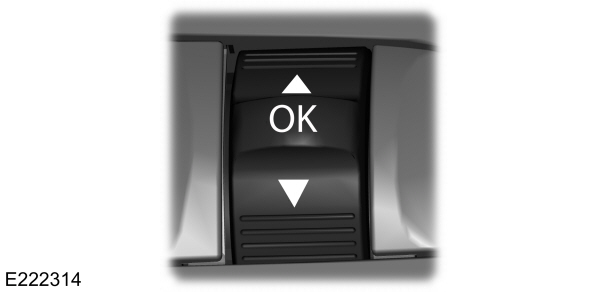
Press the OK button to acknowledge and remove some messages from the information display.Other message will be removed automatically after a short time.
Certain messages need to be confirmed before you can access the menus.
Active Park
| Message | Action | |
|---|---|---|
|
Active Park Fault |
The system requires service. Have the system checked as soon as possible. | |
Adaptive Cruise Control
| Message | Action | |
|---|---|---|
|
Adaptive Cruise Malfunction |
A radar concern is preventing the adaptive cruise from engaging. See . | |
|
Front Sensor Not Aligned |
||
|
Adaptive Cruise Not Available |
Conditions exist such that the adaptive cruise cannot function properly. See . | |
|
Adaptive Cruise Not Available Sensor Blocked See Manual |
The radar is blocked because of poor radar visibility due to inclement weather, ice, mud or water in front of radar. You can typically clean the sensor to resolve. See . | |
|
Normal Cruise Active Adaptive Braking Off |
Displays when the system disables automatic braking. | |
|
Adaptive Cruise - Driver Resume Control |
Displays when the system reinstates adaptive cruise control to you. | |
|
Adaptive Cruise Speed Too Low to Activate |
Displays when the vehicle speed is too slow to activate the adaptive cruise. | |
Adaptive Headlamps
| Message | Action | |
|---|---|---|
|
Check Headlamp System See Manual |
Displays when the system detects a concern. Have the system checked as soon as possible. | |
AdvanceTrac™ and Traction Control
| Message | Action | |
|---|---|---|
|
Service AdvanceTrac |
The system detects a condition that requires service. Have the system checked as soon as possible. | |
|
AdvanceTrac Off |
The status of the AdvanceTrac system after you switch it off. | |
|
AdvanceTrac On |
The status of the AdvanceTrac system after you switch it on. | |
|
AdvanceTrac OFF in 4x4 LOW |
The system is off while the vehicle is in 4x4 low. | |
|
AdvanceTrac SPORT MODE |
The status of the AdvanceTrac sport mode after you switch it on. | |
|
Traction Control Off |
The status of the traction control system after you switch it off. | |
|
Traction Control On |
The status of the traction control system after you switch it on. | |
Alarm
| Message | Action | |
|---|---|---|
|
Vehicle Alarm To Stop Alarm, Start Vehicle. |
Alarm triggered due to unauthorized entry. See . | |
Battery and Charging System (12 volt)
| Message | Action | |
|---|---|---|
|
Check Charging System |
The charging system needs servicing. If the warning stays on or continues to come on, have the system checked as soon as possible. | |
|
Charging System Service Soon |
The charging system needs servicing. If the warning stays on or continues to come on have the system checked as soon as possible. | |
|
Charging System Service Now |
The charging system needs servicing. Have the system checked as soon as possible. | |
|
Battery State of Charge Low |
The battery management system determines that the 12V battery is at a low state of charge. Start the engine to charge the battery or charge the battery using an aftermarket battery charger. This message clears once you restart your vehicle and the battery state of charge has recovered. | |
|
Turn Power Off To Save Battery |
The battery management system determines that the battery is at a low state of charge. Turn the ignition off as soon as possible to protect the battery. This message will clear once the vehicle has been started and the battery state of charge has recovered. Turning off unnecessary electrical loads will allow faster battery state-of-charge recovery. | |
|
Low Battery Features Temporarily Turned Off |
Displays when the battery management system detects an extended low-voltage condition. Various vehicle features will be disabled to help preserve the battery. Turn off as many of the electrical loads as soon as possible to improve system voltage. If the system voltage has recovered, the disabled features will operate again as normal. | |
Battery and Charging System (High Voltage)
| Message | Action | |
|---|---|---|
|
Stop Safely Now |
Displays when the stop safety hazard warning lamp is illuminated. This indicates an electrical component that requires service. This causes the vehicle to shut down or enter into limited operating mode. | |
Blind Spot Information and Cross Traffic Alert System
| Message | Action | |
|---|---|---|
|
Blind Spot System Fault |
A system error has occurred. Have the system checked as soon as possible. | |
|
Blind Spot Not Available Sensor Blocked See Manual |
The system sensors are blocked. See Blind Spot Information System . | |
|
Cross Traffic Alert Applying Brakes |
The system detects a vehicle and automatically applied the brakes. | |
|
Cross Traffic Not Available Sensor Blocked See Manual |
The blind spot information system and cross traffic alert system sensors are blocked.See Cross Traffic Alert . | |
|
Cross Traffic System Fault |
A system error has occurred. Have the system checked as soon as possible. | |
|
Cross Traffic Alert Deactivated Trailer Attached |
The system automatically turns off and displays this message when you connect a trailer to the vehicle that does not have a trailer blind spot system or when you switch the trailer blind spot system off through the information display. See Cross Traffic Alert . | |
|
Blind Spot Alert Deactivated Trailer Attached |
The system automatically turns off and displays this message when you connect a trailer to the vehicle that does not have a trailer blind spot system or when you switch the trailer blind spot system off through the information display. See Blind Spot Information System . | |
Doors and Locks
| Message | Action | |
|---|---|---|
|
Driver Door Ajar |
The driver door is not completely closed. | |
|
Passenger Door Ajar |
The passenger door is not completely closed. | |
|
Rear Left Door Ajar |
The rear left door is not completely closed. | |
|
Rear Right Door Ajar |
The rear right door is not completely closed. | |
|
Liftgate Ajar |
The liftgate is not completely closed. | |
|
Hood Ajar |
The hood is not completely closed. | |
|
Switches Inhibited Security Mode |
The system has disabled the door switches. | |
|
Doors Locked Unlock Before Opening |
Displays when the door lock is turned on and you attempt to open the door. | |
|
Driver Door Fault Use Inside Override Lever In Map Pocket |
Indicates a driver door fault that requires manually opening the door by the override lever. Have the system checked as soon as possible. | |
|
Door Fault Service Required |
Indicates a fault with the electronic door system. Have the system checked as soon as possible. | |
|
Child Lock Malfunction Service Required |
There is a system malfunction with the child locks. Have the system checked as soon as possible. | |
|
Child Lock ON |
Indicates that the rear seat interior door release switches and power windows are switched off, preventing rear seat occupants from opening the doors or windows. | |
|
Child Lock OFF |
Indicates that the rear seat interior door release switches and power windows are switched on, allowing the rear seat occupants to open the doors and windows. | |
|
Factory Keypad Code {X X X X X} |
The factory keypad code displays in the information display after the system resets the keypad. See . | |
Driver Alert
| Message | Action | |
|---|---|---|
|
Driver Alert Warning Rest Now |
Stop and rest as soon as it is safe to do so. | |
|
Driver Alert Warning Rest Suggested |
Take a rest soon. | |
Fuel
| Message | Action | |
|---|---|---|
|
Fuel Level Low |
An early reminder of a low fuel condition. | |
|
Check Fuel Fill Inlet |
The fuel fill inlet may not be properly closed. | |
|
Fuel Door Opening |
Wait for up to 15 seconds while the fuel system depressurizes. | |
|
Fuel Door Open |
The fuel system has finished depressurizing and you can begin to refuel. | |
|
Close Fuel Door to Avoid ""Check Engine"" Light |
A reminder to close the fuel door. Failure to follow this instruction can cause the check engine light to illuminate. | |
|
Refuel Error See Manual |
There is an error in attempting to refill your vehicle. | |
Hill Descent Control
| Message | Action | |
|---|---|---|
|
Hill Descent Control OFF |
Displays when you deactivate hill descent control mode. | |
|
For Hill Descent Reduce Speed 20 MPH or Less |
Displays when hill descent speed exceeds 20 mph (32 km/h). | |
|
For Hill Descent Reduce Speed 32 Km/h or Less |
Displays when hill descent speed exceeds 20 mph (32 km/h). | |
|
For Hill Descent Select Gear |
Displays when hill descent control mode requires you to shift the transmission into gear. | |
|
Hill Descent Driver Resume Control |
Displays when the hill control mode requires you to resume control. | |
|
Hill Descent Control Fault |
Displays when a hill descent system fault is present. | |
|
Hill Descent Control Off System Cooling |
Displays when you disable the hill descent control mode to cool the brake system. | |
|
Hill Descent Control Ready |
Displays when hill descent control mode is ready. | |
|
Hill Descent Control Active |
Displays when you activate the hill descent control mode. | |
Hill Start Assist
| Message | Action | |
|---|---|---|
|
Hill Start Assist Not Available |
Hill start assist is not available. Have the system checked as soon as possible. See . | |
Keys and Intelligent Access
| Message | Action | |
|---|---|---|
|
To START Press Brake |
A reminder to press the brake while starting your vehicle. | |
|
No Key Detected |
The key is not detected by the system. | |
|
Restart Now or Key is Needed |
The Start Stop button is pressed to shut off the engine and an Intelligent Access key is not detected inside your vehicle. | |
|
Full Accessory Power Active |
Your vehicle is in the accessory ignition state. | |
|
Starting System Fault |
There is a problem with your vehicle’s starting system. Have the system checked as soon as possible. | |
|
Key Program Successful |
During spare key programming, an intelligent access key is programmed to the system. | |
|
Max Number of Keys Learned |
During spare key programming, the maximum number of keys have been programmed. | |
|
Key Program Failure |
Displays during spare key programming, when intelligent access key programming fails. | |
|
Not Enough Keys Learned |
Displays during spare key programming when you have not programmed enough keys. | |
|
Key Battery Low Replace Soon |
Displays when the key battery is low. Change the battery as soon as possible. | |
|
Vehicle Switched Off |
Displays when you switch the vehicle off. | |
|
Vehicle is ON |
Informs you that upon exiting your vehicle that the vehicle is still on. | |
Lane Keeping System
| Message | Action | |
|---|---|---|
|
Lane Keeping Sys. Malfunction Service Required |
The system has malfunctioned. Have the system checked as soon as possible. | |
|
Front Camera Temporarily Not Available |
The system has detected a condition that has caused the system to be temporarily unavailable. | |
|
Front Camera Low Visibility Clean Screen |
The system has detected a condition that requires the windshield to be cleaned to operate properly. | |
|
Front Camera Malfunction Service Required |
The system has malfunctioned. Have the system checked as soon as possible. | |
|
Keep Hands on Steering Wheel |
The system requests the driver to keep their hands on the steering wheel. | |
Maintenance
| Message | Action | |
|---|---|---|
|
Low Engine Oil Pressure |
Stop your vehicle as soon as safely possible and turn off the engine. Check the oil level. If the warning stays on or continues to come on with your engine running, have the system checked as soon as possible. | |
|
Change Engine Oil Soon |
The engine oil life is low and needs to be changed soon. | |
|
Oil Change Required |
The engine oil life is low and needs to be changed immediately. | |
|
Brake Fluid Level Low |
The brake fluid level is low and the brake system should be inspected immediately. See . | |
|
Check Brake System |
The brake system needs servicing. Stop the vehicle in a safe place. Contact an authorized dealer. | |
|
Engine Coolant Over Temperature |
The engine coolant temperature is excessively high. | |
|
Washer Fluid Level Low |
The washer fluid is low and needs to be refilled. | |
|
Transport Mode Contact Dealer |
Indicates that your vehicle is still in Transport mode. This may not allow some features to operate properly. Have the system checked as soon as possible. | |
|
Factory Mode Contact Dealer |
Indicates that your vehicle is still in Factory mode. This may not allow some features to operate properly. Have the system checked as soon as possible. | |
|
See Manual |
Informs the driver that the powertrain needs service due to a powertrain malfunction. | |
|
Power Reduced to Lower Engine Temp |
The engine has reduced power to help reduce high engine temperature. | |
|
Brake Applied Power Reduced |
The brake system has reduced stopping power. | |
MyKey
| Message | Action | |
|---|---|---|
|
MyKey not Created |
You cannot program a MyKey. | |
|
MyKey Active Drive Safely |
MyKey is active. | |
|
Speed Limited to {avg speed XXXX} km/h |
When switching on your vehicle and MyKey is in use, displays that the MyKey speed limit is on. | |
|
Near Vehicle Top Speed |
MyKey is in use and the MyKey speed limit is on and the vehicle speed is approaching 81 mph (130 km/h). | |
|
Vehicle at Top Speed of MyKey Setting |
You have reached the speed limit set for your MyKey. | |
|
Check Speed Drive Safely |
You have an active MyKey with a programmed set speed limit. | |
|
Buckle Up to Unmute Audio |
Belt-Minder turns on with a MyKey in use. | |
|
AdvanceTrac On - MyKey Setting |
With a MyKey in use, AdvanceTrac turns on. | |
|
Traction Control On - MyKey Setting |
With a MyKey in use, traction control turns on. | |
|
MyKey Park Aid Cannot be Deactivated |
With a MyKey in use, park aid is always on. | |
|
Lane Keeping Alert On MyKey Setting |
With a MyKey in use, lane keeping alert turns on. | |
Park Aid
| Message | Action | |
|---|---|---|
|
Check Front Park Aid |
The system detects a fault that requires service.Have your vehicle checked as soon as possible. | |
|
Check Rear Park Aid |
The system detects a fault that requires service. Have your vehicle checked as soon as possible. | |
|
Rear Park Aid Not Available Sensor Blocked See Manual |
The radar is blocked due to bad weather, ice, mud or water in front of radar. You can typically clean the sensor to resolve. See Rear Parking Aid . | |
|
Front Park Aid Not Available Sensor Blocked See Manual |
The radar is blocked due to bad weather, ice, mud or water in front of radar. You can typically clean the sensor to resolve. See . | |
|
Park Aid Not Available Sensor Blocked See Manual |
The radar is blocked due to bad weather, ice, mud or water in front of radar. You can typically clean the sensor to resolve. See . | |
|
Front Park Aid On Off |
Displays the park aid status. | |
|
Rear Park Aid On Off |
Displays the park aid status. | |
Park Brake
| Message | Action | |
|---|---|---|
|
Park Brake Engaged |
The parking brake is set, the engine is running and you drive your vehicle more than 3 mph (5 km/h). If the warning stays on after the parking brake is released, contact an authorized dealer as soon as possible. | |
|
To Release: Press Brake and Switch |
The electric parking brake is set and a manual release is attempted without the brake pedal being pressed. | |
|
Park Brake Use Switch to Release |
The electric parking brake is set and an automatic release is attempted but cannot be performed. Perform a manual release. | |
|
Release Park Brake |
The electric parking brake is set and your vehicle speed exceeds 3 mph (5 km/h). Release park brake before continued driving. | |
|
Park Brake Not Applied |
The electric parking brake is not fully applied. | |
|
Park Brake Not Released |
The electric parking brake is not fully released. | |
|
Park Brake Maintenance Mode |
The electric parking brake system has been put into a special mode that is used to allow service of the rear brakes. Have the system checked as soon as possible. | |
|
Park Brake Limited Function Service Required |
The electric park brake system has detected a condition that requires service. Some functionality may still be available. Have the system checked as soon as possible. | |
|
Park Brake Malfunction Service Now |
The electric parking brake system has detected a condition that requires service. Have the system checked as soon as possible. | |
|
Park Brake System Overheated |
Numerous park brake applies have overheated the system. Wait 2 minutes before attempting to apply again. | |
Power Steering
| Message | Action | |
|---|---|---|
|
Steering Fault Service Now |
The power steering system has detected a condition that requires service. Have the system checked as soon as possible. | |
|
Steering Loss Stop Safely |
The power steering system is not working.Stop your vehicle in a safe place.Have the system checked as soon as possible. | |
|
Steering Assist Fault Service Required |
The power steering system has detected a condition within the power steering system or passive entry or passive start system that requires service. Have the system checked as soon as possible. | |
|
Steering Lock Malfunction Service Now |
The steering lock system has detected a condition that requires service. Have the system checked as soon as possible. | |
Pre-Collision Assist
| Message | Action | |
|---|---|---|
|
Pre-Collision Assist Not Available Sensor Blocked |
You have a blocked sensor due to inclement weather, ice, mud or water in front of the radar sensor. You can typically clean the sensor to resolve. | |
|
Pre-Collision Assist Not Available |
A fault with the system has occurred. Have the system checked as soon as possible. | |
Remote Start
| Message | Action | |
|---|---|---|
|
To Drive: Press Brake and Gear Shift Button |
Displays as a reminder to apply the brake and push the gear shift button to drive the vehicle after a remote start. | |
Seats
| Message | Action | |
|---|---|---|
|
Occupant Sensor BLOCKED Remove Objects Near Passenger Seat |
Objects are by the passenger seat. After the objects are moved away from the seat, if the warning stays on or continues to come on have the system checked as soon as possible. | |
|
Memory Recall Not Permitted While Driving |
Displays as a reminder that memory seats are not available while driving. | |
| Memory X Saved | Displays to show where your memory setting has been saved. | |
Starting System
| Message | Action | |
|---|---|---|
|
To START Press Brake |
Displays when starting the vehicle as a reminder to apply the brake. | |
|
Cranking Time Exceeded |
Displays when the starter has exceeded its cranking time in attempting to start the vehicle. | |
|
Engine Start Pending Please Wait |
Displays when the starter is attempting to start the vehicle. | |
|
Pending Start Cancelled |
Displays when the pending start has been cancelled. | |
Tire Pressure Monitoring System
| Message | Action | |
|---|---|---|
|
Tire Pressure Low |
One or more tires on your vehicle have low tire pressure.See . | |
|
Tire Pressure Monitor Fault |
The tire pressure monitoring system is malfunctioning. If the warning stays on or continues to come on, have the system checked as soon as possible. See . | |
|
Tire Pressure Sensor Fault |
A tire pressure sensor is malfunctioning, or your spare tire is in use. For more information on how the system operates under these conditions, See . If the warning stays on or continues to come on, have the system checked as soon as possible. | |
Trailer
| Message | Action |
|---|---|
|
Trailer Connected |
A correct trailer connection is sensed during a given ignition cycle. |
|
Trailer Disconnected |
A trailer connection becomes disconnected, either intentionally or unintentionally, and has been sensed during a given ignition cycle. |
|
Trailer Sway Reduce Speed |
The trailer sway control has detected trailer sway. |
|
Trailer Wiring Fault |
There are certain faults in your vehicle wiring and trailer wiring/brake system. See . |
|
Trailer Left Turn Lamps Fault Check Lamps |
There is a fault with your trailer turn lamp. Check your lamp. |
|
Trailer Right Turn Lamps Fault Check Lamps |
There is a fault with your trailer turn lamp. Check your lamp. |
|
Trailer Battery Not Charging See Manual |
There is a fault with your trailer battery. See . |
|
Trailer Lighting Module Fault See Manual |
There is a fault with your vehicle trailer lighting module. See . |
Transmission
| Message | Action | |
|---|---|---|
|
Shift to Park |
You switched the engine off and shift select lever is in any position other than park (P). | |
|
Transmission Warming Up Please Wait |
Transmission is too cold. Wait for it to warm up before you drive. | |
|
Press Brake Pedal |
Displays when the brake pedal needs to be depressed. | |
|
Transmission Over Temperature Stop Safely |
The transmission is overheating and needs to cool.Stop in a safe place as soon as it’s possible. | |
|
Transmission Service Required |
Have the system checked as soon as possible. | |
|
Transmission Too Hot Press Brake |
The transmission is overheating and needs to cool.Stop in a safe place as soon as it’s possible. | |
|
Transmission Limited Function See Manual |
The transmission has limited functionality.Have the system checked as soon as possible. | |
|
Transmission Not in Park |
A reminder to shift into park. In addition, this message is typical after reconnecting or recharging the battery until you cycle the ignition to the on mode. See Changing the 12V Battery . | |
|
SHIFT SYS FAULT Confirm Park Brake Apply Before Exiting the Vehicle |
Displays when there is a system fault and the park brake needs to be depressed before exiting the vehicle. Have the system checked as soon as possible. | |
|
SHIFT SYS FAULT Service Required |
Have the system checked as soon as possible. | |
|
SHIFT SYS FAULT Vehicle is Shifting to Park |
Displays when there is a system fault while the vehicle is shifting to park. Have the system checked as soon as possible. | |
|
SHIFT SYS FAULT Reverse Unavailable Service Required |
Displays when there is a system fault while the vehicle is shifting to reverse. Have the system checked as soon as possible. | |
|
SHIFT SYS FAULT Drive Unavailable Select S for Drive Service Required |
Have the system checked as soon as possible. | |
|
SHIFT SYS FAULT Neutral Unavailable Service Required |
Have the system checked as soon as possible. | |
|
SHIFT SYS FAULT Sport Unavailable Service Required |
Have the system checked as soon as possible. | |
|
Invalid Gear Selection |
Displays when an invalid gear has been selected. | |
|
Depress Brake to Shift from Park |
Displays when the brake pedal needs to be depressed to enable the transmission to shift from park. | |
|
Neutral Tow Engaged Turn Ignition Off for Towing |
Reminder to switch off the ignition while in neutral tow. | |
|
Neutral Tow Engaged Depress Brake and Select Park to Exit Neutral Tow |
Displays when neutral hold is active and you want to exit neutral tow. | |
|
Neutral Tow Remove Park Brake for Towing |
Reminder to remove park brake while in neutral tow. | |
|
Neutral Tow Disengaged |
Displays when the neutral tow is off. | |
|
Neutral Tow Enabled Leave Transmission in Neutral |
Displays when neutral tow is on. | |
4WD
| Message | Action | |
|---|---|---|
|
4WD Temporarily Disabled |
The four wheel drive system has automatically disabled itself due to the system overheating. | |
|
4WD Temporarily Locked |
The four wheel drive system is locking up the torque transfer clutch to help reduce clutch temperature. | |
|
4WD Off |
Displays when the system automatically disables to protect itself. This may be caused by operating the vehicle with a mini spare tire installed, if the system detects dissimilar size tires, or if there is an issue with another vehicle system preventing 4WD operation. The system resumes normal operation and clears this message after you cycle the ignition on and off and drive a short distance with the road tire re-installed or after the other vehicle system issues are resolved. | |
|
4WD Restored |
Displays after the system cools and the four wheel drive system resumes normal function. | |
|
4WD Fault Service Required |
The four wheel drive system is not operating properly and the powertrain fault indicator illuminates. If the warning stays illuminated or continues to illuminate, contact an authorized dealer as soon as possible. | |
|
Change 4WD Power Transfer Unit Lube |
Displayed when the transfer case fluid requires service. | |
|
4WD Power Transfer Unit Lube Set to New |
Displayed when the transfer case fluid has been changed and reset to new. | |
Download Manual