Keys
Your vehicle is equipped with a key fob which supports Passive Entry, Remote Keyless Entry (RKE), Keyless Enter ‘n Go™ (if equipped), Remote Start (if equipped), and remote trunk release. The key fob allows you to lock or unlock the doors and trunk from distances up to approximately 66 ft (20 m). The key fob does not need to be pointed at the vehicle to activate the system. The key fob also contains an emergency key, which is stored in the rear of the key fob.
Note:
-
The key fob’s wireless signal may be blocked if the key fob is located next to a mobile phone, laptop, or other electronic device. This may result in poor performance.
-
With ignition in the ON position and the vehicle moving at 2 mph (4 km/h), all RKE commands are disabled.
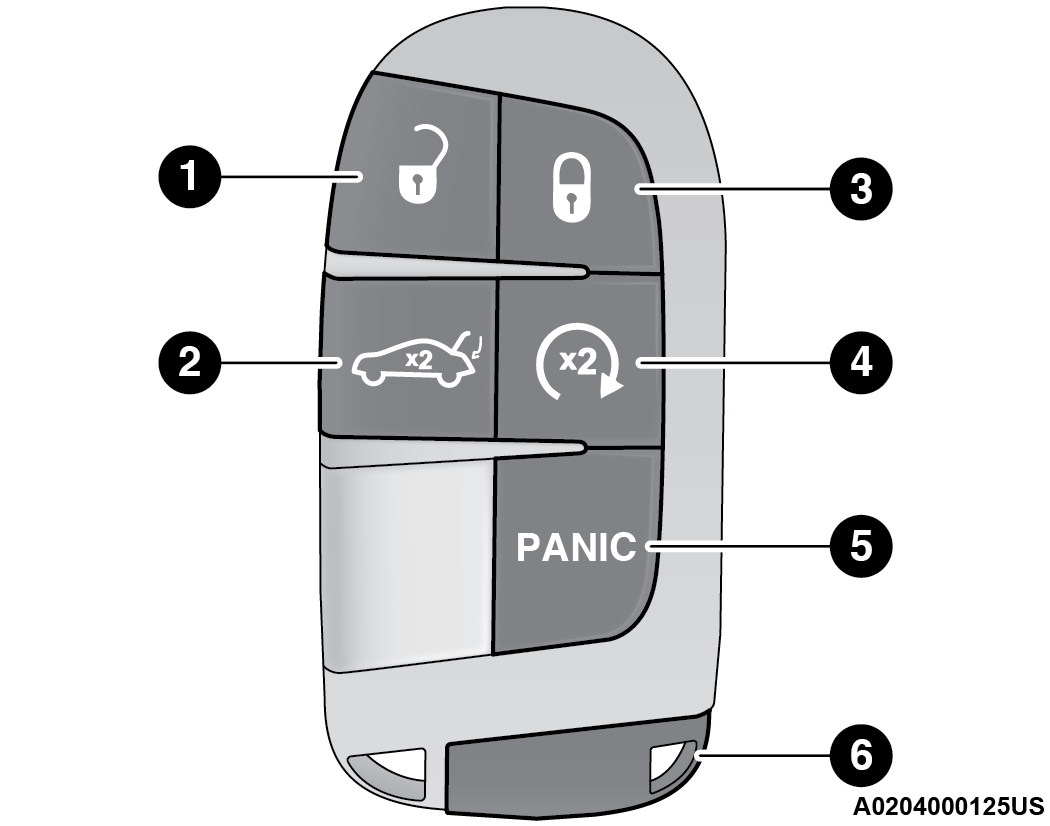
Key Fob
|
1 — Unlock |
|
2 — Trunk Open |
|
3 — Lock |
|
4 — Remote Start |
|
5 — Panic Button |
|
6 — Emergency Key |
Note:
In case the ignition switch does not change with the push of a button, the key fob may have a low or fully depleted battery. A low key fob battery can be verified by referring to the instrument cluster, which will display directions to follow "⇨GENERAL INFORMATION".
TO LOCK/UNLOCK THE DOORS AND TRUNK
Push and release the unlock button on the key fob once to unlock the driver’s door, or twice within five seconds to unlock all the doors and the trunk. To lock all the doors and the trunk, push the lock button once.
When the doors are unlocked, the turn signals will flash and the illuminated entry features will be activated. When the doors are locked, the turn signals will flash and the horn will chirp.
Note:
-
If the vehicle is unlocked by Passive Entry and no door is opened within 60 seconds, the vehicle will relock and the Vehicle Security system (if equipped) will arm.
-
If one or more doors are open, or the trunk is open, the doors will lock. The doors will unlock automatically if the key fob is left inside the passenger compartment, otherwise the doors will stay locked.
All doors can be programmed to unlock on the first push of the unlock button through Uconnect Settings "⇨UCONNECT SETTINGS".
Note:
When you use the key fob to open any door, the courtesy lights, overhead lights, and approach lighting in the outside mirrors (if equipped) will turn on.
USING THE PANIC FEATURE
To turn the Panic feature on or off, push the Panic button on the key fob. When the Panic feature is activated, the turn signals will flash, the horn will pulse on and off, and the interior lights will turn on.
The Panic feature will stay on for three minutes unless you turn it off by either pushing the Panic button a second time or drive the vehicle at a speed of 15 mph (24 km/h) or greater.
Note:
-
The interior lights will turn off if you place the ignition in the ACC or ON/RUN position while the Panic feature is activated. However, the exterior lights and horn will remain on.
-
You may need to be less than 35 ft (11 m) from the vehicle when using the key fob to turn off the Panic feature due to the radio frequency noises emitted by the system.
KEY LEFT VEHICLE FEATURE
If a valid key fob is no longer detected inside the vehicle while the vehicle’s ignition system is in the ON/RUN or START position, the message “Key Fob Has Left The Vehicle” will be shown in the instrument cluster display along with an interior chime. An exterior audible and visual alert will also be activated to warn the driver.
The vehicle’s horn will rapidly chirp three times along with a single flash of the vehicle’s exterior lights.
Note:
-
The doors have to be open and then closed in order for the vehicle to detect a key fob; the Key Left Vehicle feature will not activate until all of the doors are closed.
-
These alerts will not be activated in situations where the vehicle’s engine is left running with the key fob inside.
TO UNLATCH THE TRUNK
Push the trunk button on the key fob two times within five seconds to unlatch the trunk.
REPLACING THE BATTERY IN THE KEY FOB
The recommended replacement battery is one CR2032 battery.
Note:
-
Customers are recommended to use a battery obtained from Mopar®. Aftermarket coin battery dimensions may not meet the original OEM coin battery dimensions.
-
Perchlorate material — special handling may apply. See www.dtsc.ca.gov/hazardouswaste/perchlorate for further information.
-
Do not touch the battery terminals that are on the back housing or the printed circuit board.
-
Remove the emergency key (2) by sliding the emergency key release (1) on the back of the key fob and pulling the emergency key out with your other hand.
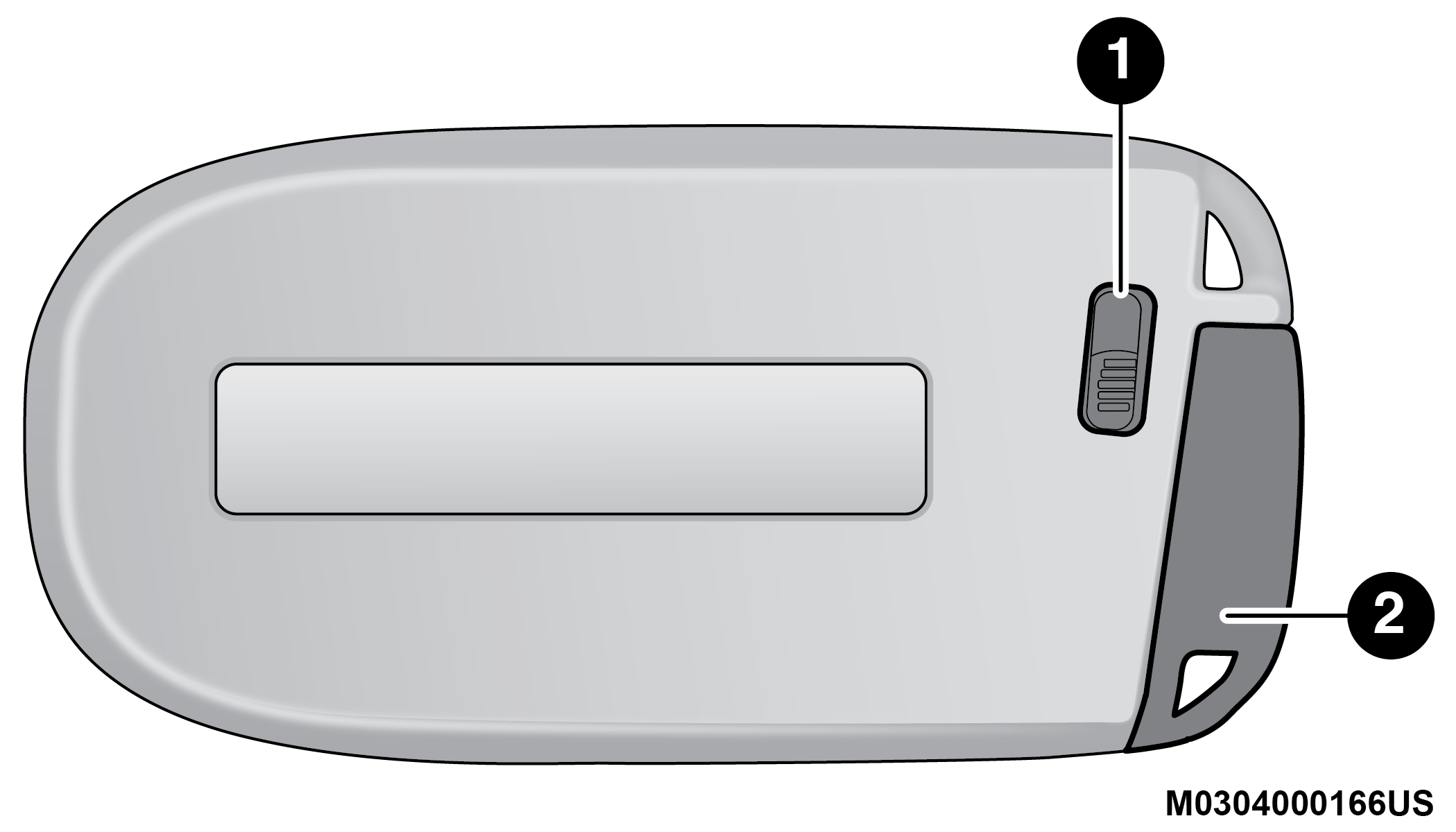
Emergency Key Removal
1 — Emergency Key Release Button 2 — Emergency Key -
Separate the key fob halves using a #2 flat-blade screwdriver or a coin, and gently pry the two halves of the key fob apart. Make sure not to damage the seal during removal.
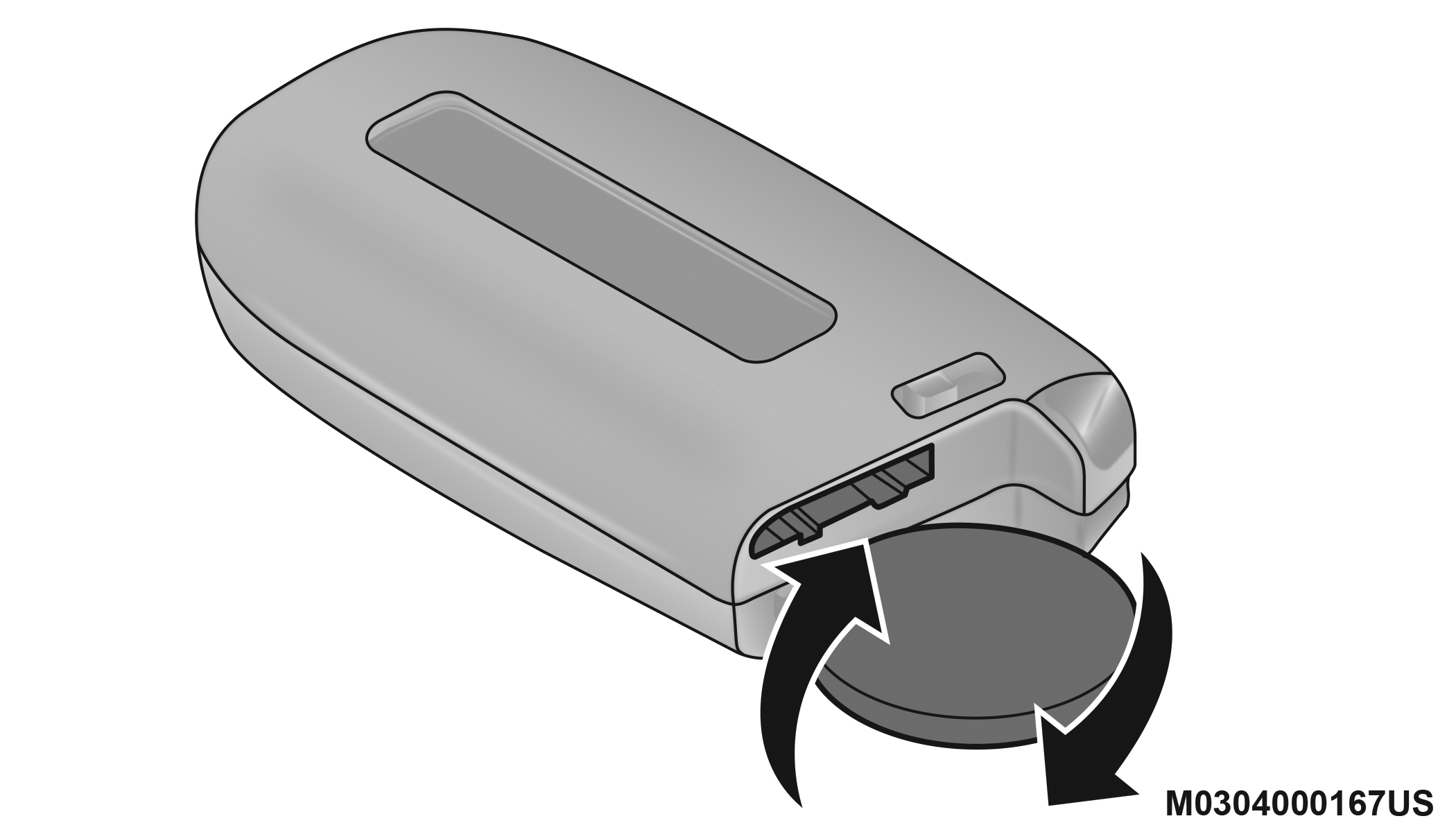
Separating Case With A Coin
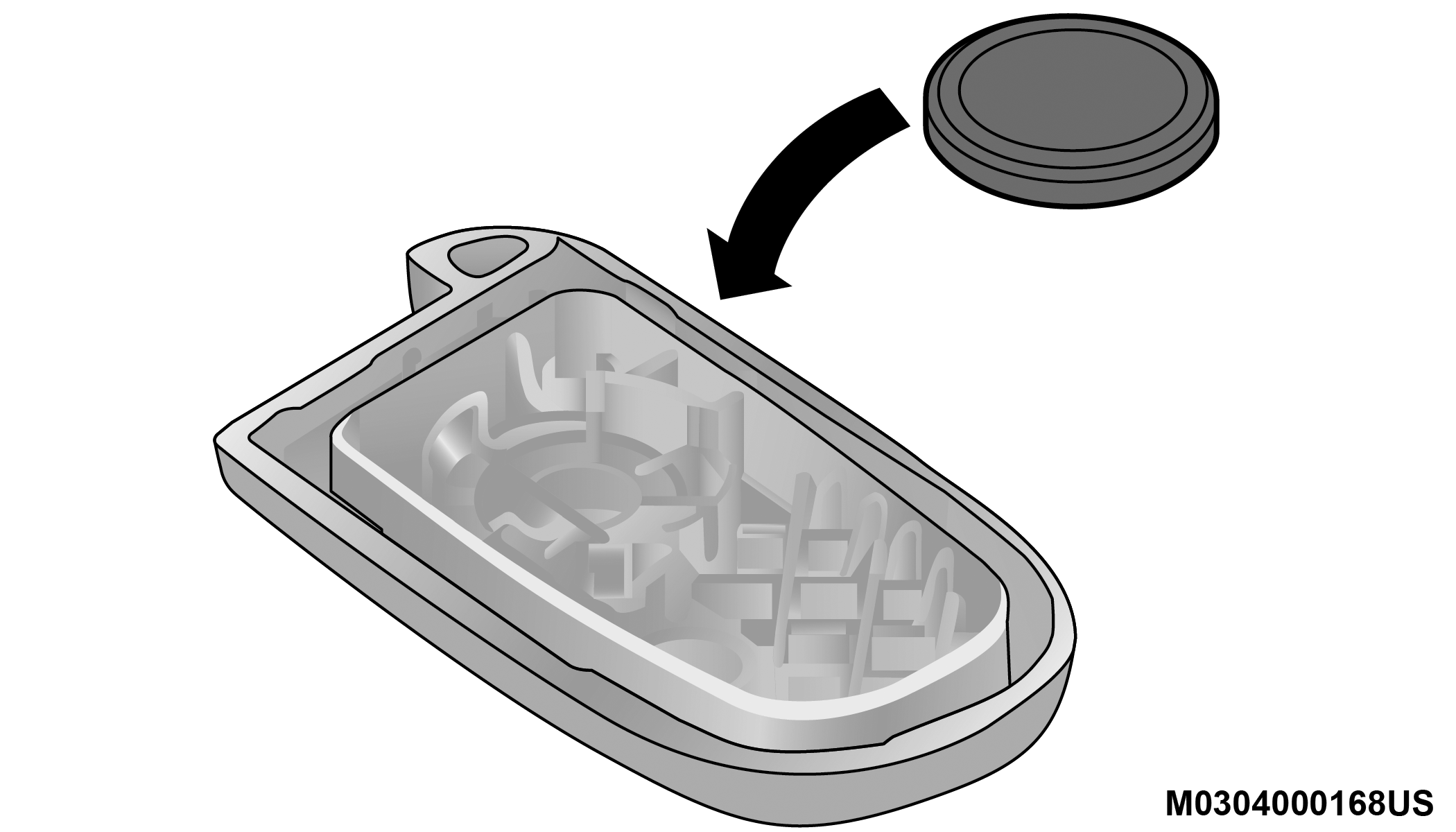
Key Fob Battery Replacement
-
Remove the back cover to access and replace the battery. When replacing the battery, match the (+) sign on the battery to the (+) sign on the inside of the battery clip, located on the back cover. Avoid touching the new battery with your fingers. Skin oils may cause battery deterioration. If you touch a battery, clean it with rubbing alcohol.
-
To assemble the key fob case, snap the two halves together.
WARNING:
-
The integrated key fob contains a coin cell battery. Do not ingest the battery; there is a chemical burn hazard. If the coin cell battery is swallowed, it can cause severe internal burns in just two hours and can lead to death.
-
If you think a battery may have been swallowed or placed inside any part of the body, seek immediate medical attention.
-
Keep new and used batteries away from children. If the battery compartment does not close securely, stop using the product and keep it away from children.
PROGRAMMING AND REQUESTING ADDITIONAL KEY FOBS
Programming the key fob may be performed by an authorized dealer.
Note:
-
Once a key fob is programmed to a vehicle, it cannot be repurposed and reprogrammed to another vehicle.
-
Only key fobs that are programmed to the vehicle electronics can be used to start and operate the vehicle.
WARNING:
-
Always remove the key fobs from the vehicle and lock all doors when leaving the vehicle unattended.
-
For vehicles equipped with Keyless Enter ‘n Go™ Ignition, always remember to place the ignition in the OFF position when exiting the vehicle.
Duplication of key fobs may be performed at an authorized dealer. This procedure consists of programming a blank key fob to the vehicle electronics. A blank key fob is one that has never been programmed.
Note:
-
When having the Sentry Key Immobilizer system serviced, bring all vehicle keys with you to an authorized dealer.
-
Keys must be ordered to the correct key cut to match the vehicle locks.
Download Manual