Driving stability control systems
Antilock Braking System
The Antilock Braking System prevents locking of the wheels during braking.
The vehicle maintains its steerability even during emergency braking, which increases the active driving safety.
The Antilock Braking System is ready after each engine start.
Brake assistant
The brake assistant automatically applies maximum braking assistance when the brake pedal is depressed quickly. It reduces the braking distance to a minimum during emergency braking. The advantages of the Antilock Braking System are thereby utilized.
Do not reduce the pressure on the brake pedal during full braking.
Adaptive brake assistant
The Adaptive Brake Assist, together with Active Cruise Control, ensures that the brake responds even faster in critical situations when braking.
Drive-off assistant
Principle
The drive-off assistant supports driving off on uphill grades.
Driving off
Hold the vehicle by depressing the brake pedal.
Release the brake pedal and drive off quickly.
After the brake pedal is released, the vehicle is held in place for approx. 2 seconds.
Depending on the vehicle loading, the vehicle may roll back slightly.
In order to prevent rolling back when driving off, use the parking brake.

Pull and release switch before driving off.
The parking brake is set.
Step on the accelerator pedal sufficiently to drive off.
M Menu
Principle
Buttons M1 or M2 on the steering wheel can be used to store individual settings for the vehicle and call them up again as needed.
General information
The buttons are preset with the correct configuration for the vehicle and can be adjusted individually.
When the drive-ready state is switched on after the idle state, an efficient vehicle condition is active by default. The configuration via the buttons is deactivated.
Safety information

Modify your driving style and intervene as needed
Settings
Depending on vehicle equipment, the settings for the following systems can be stored using the M1 or M2 buttons:
|
Icon |
Meaning |
|---|---|
|
|
"Engine": programs of M Engine Dynamics Control. |
|
|
"Transmission": shift modes and Drivelogic programs. Drivelogic. |
|
|
"Chassis": programs of Adaptive M suspension. |
|
|
"Steering": programs of Servotronic. |
|
|
"DSC": Dynamic Stability Control and M Dynamic Mode. |
|
|
"M xDrive": programs of M xDrive. |
|
|
"Start/Stop": Auto Start/Stop function. |
|
|
"Sound Control": Sound Control. |


Overview
Buttons on the steering wheel
|
Button |
Function |
|---|---|
|
|
M1 |
|
|
M2 |
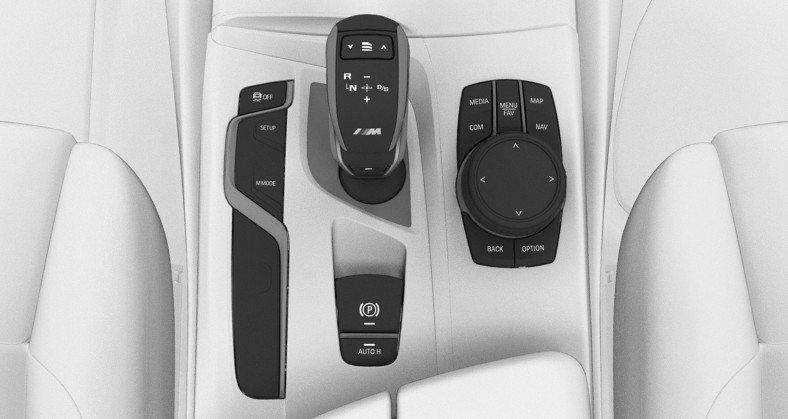
Button in the center console
1
1
SETUP
Configuration
Via iDrive
"CAR"

"M menu"
"Configure M1" or "Configure M2"
Select the desired setting.
Select the desired program.
The individual settings are stored for the configuration currently in use.
When M1 or M2 is active, any changes to the setting are immediately applied.
Using the button
A reduced number of systems and functions can be adjusted directly.
Press the button.
Turn the Controller to select the desired setting.
Press the Controller to change the desired program.
Activating
Press the corresponding button on the steering wheel:

Activate M1.

Activate M2.
If DSC OFF or MDM is set under "Configure M1" or "Configure M2", a message is displayed in the instrument cluster. This message is confirmed by pressing the button again.
Deactivating
Press the corresponding button on the steering wheel.
Resetting the configuration
Individual settings can be reset to default values.
"CAR"
"M menu"
"Configure M1" or "Configure M2"
"Reset"
"Yes"
To cancel resetting: "No"
Display in the instrument cluster
|
Icon |
Description |
|---|---|
|
|
Icon lights up: corresponding configuration is activated. |
|
|
Icon lights up and additional lettering "Cannot be activated" appears: configuration cannot be activated due to the current driving situation. Reactivate configuration when the lettering is not illuminated. |


M MODE
Principle
The driving experience can be adjusted depending on the situation using various programs.
General information
The following programs are available:
"ROAD"
"SPORT"
"TRACK"
Safety information
Observe surrounding traffic and adapt driving style
Indicators and warnings do not absolve the driver from personal responsibility
Overview
Button in the vehicle
1
1
M MODE

M MODE
Programs
ROAD
All available Intelligent Safety systems are turned on.
All available driver assistance systems are active.
SPORT
The Intelligent Safety systems are switched on according to the individual settings.
Depending on the equipment, the following systems are deactivated:
Manual Speed Limiter.
Cruise control.
Active Cruise Control with Stop&Go function.
Speed Limit Assistant.
Speed Limit Info with preview.
Steering Assistant.
Traffic Jam Assistant.
Automatic Lane Change Assistant.
Activating a system will automatically switch to ROAD mode.
TRACK
The Intelligent Safety systems are switched off.
In addition to the deactivated systems in SPORT mode, the following systems are deactivated depending on vehicle equipment:
Speed Limit Info with no-passing indicator.
Forward Collision Warning with light braking function.
Evasion Assistant.
Rear-end collision preparation.
Hazard flashing with hard braking right before standstill is deactivated.
Control Display is switched off.
The functions of the entertainment system are switched off.
Selecting a program
Press the button to switch between ROAD and SPORT.
To switch to TRACK mode, hold the button down until a message is displayed on the Control Display. Confirm the message.
Pressing the button again switches back to ROAD mode.
Display
The display changes according to the drive mode selected. The view can be configured individually.
Servotronic
Principle
Servotronic is a speed-dependent power steering function.
The system provides the steering force with more support at low speeds than at higher ones. This makes it easier to park, for instance, and makes steering firmer when driving at faster speeds.
Furthermore, the steering force adapts according to the program, so that a firm, sporty feel or a comfortable steering response is conveyed.
General information
The system offers several different steering force tunings.
|
Program |
Steering force tuning |
|---|---|
|
"COMFORT" |
Low steering forces, good roadway feedback. |
|
"SPORT" |
High steering forces, maximum roadway feedback. |
Overview
Button in the vehicle
1
1
SETUP
Selecting a program
Using the button
Press the button and select the desired program on the Control Display.
Via iDrive
It is possible to configure the required program for buttons M1 or M2.
"CAR"
"M menu"
"Configure M1" or "Configure M2"

"Steering"
Select the desired program.
The setting is immediately applied with active M1 or M2 configuration.
To activate the desired configuration with the selected settings, press the corresponding button on the steering wheel:
Display in the instrument cluster

When the display of the widget in the instrument cluster for M SETUP is activated, the selected program is displayed.
Additional information:
Widgets in the instrument cluster.
Dynamic Stability Control
Principle
Animation: Dynamic Stability Control

The Dynamic Stability Control helps to keep the vehicle on a steady course by reducing drive power and by brake intervention on individual wheels.
General information
The Dynamic Stability Control will detect, e.g., the following unstable driving conditions:
Skidding, which can lead to oversteering.
Loss of adhesion of the front wheels, which can lead to understeering.
Safety information
Also observe surrounding traffic and adapt driving style
Do not deactivate the Dynamic Stability Control when driving with a roof load
Overview
Button in the vehicle
1
1
Driving stability control
Deactivating/activating the Dynamic Stability Control
General information
When the Dynamic Stability Control is deactivated, driving stability is limited when accelerating and cornering.
To support driving stability, reactivate Dynamic Stability Control as soon as possible.
Deactivating the system

Hold the button down until DSC OFF is displayed in the instrument cluster and the DSC OFF indicator light is illuminated.
M xDrive appears on the Control Display. The required program can be selected.
Additional information:
M xDrive.
Activating the system
Press the button.
DSC OFF and the DSC OFF indicator light turn off.
Display
In the instrument cluster
If the Dynamic Stability Control is deactivated, DSC OFF is displayed in the instrument cluster.
Indicator/warning lights
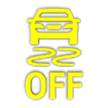
Indicator light illuminates: Dynamic Stability Control is deactivated.

Indicator light blinks: Dynamic Stability Control controls the drive and brake forces.
Indicator light illuminates: the Dynamic Stability Control has malfunctioned.
M Dynamic Mode
Principle
M Dynamic Mode allows a ride with high longitudinal and lateral acceleration but with limited driving stability.
Only in the absolute limit range does the system intervene for stabilization by reducing the engine power and by brake interventions on the wheels. In this driving condition, additional steering corrections may be necessary.
General information
Depending on vehicle equipment, the active M xDrive mode is: "4WD SPORT" when M Dynamic Mode is activated.
In the following exceptional situations, it may be expedient to briefly activate M Dynamic Mode:
When rocking the vehicle free from deep snow or driving off from loose ground.
With an increased need for dynamics or longitudinal acceleration, for instance when driving on a race track.
To support driving stability, reactivate the Dynamic Stability Control.
Safety information
Observe surrounding traffic and intervene where appropriate
Overview
Button in the vehicle
1
1
Driving stability control
Activate/deactivate
Using the button

Press the button.
Via iDrive
It is possible to configure M Dynamic Mode for buttons M1 or M2.
"CAR"
"M menu"
"Configure M1" or "Configure M2"

"DSC"
"MDM"
To activate the desired configuration with the selected settings, press the corresponding button on the steering wheel:
A message appears in the instrument cluster. This message is confirmed by pressing the button again.
Display in the instrument cluster
|
Icon |
Description |
|---|---|
|
|
Icons light up: M Dynamic Mode is activated. |
|
|
The Dynamic Stability Control indicator light is blinking in addition: M Dynamic Mode controls the drive forces and braking forces. |
|
|
Indicator lights light up: The M Dynamic Mode or the Dynamic Stability Control has malfunctioned. |



M xDrive
Principle
Animation: M xDrive
M xDrive is the all-wheel-drive system of the vehicle. The M xDrive and the Dynamic Stability Control work together to optimize the traction and driving dynamics. M xDrive variably distributes the drive forces to the front and rear axles as demanded by the driving situation and road condition.
General information
There arethree M xDrive programs available when the DSC Dynamic Stability Control is deactivated.
Overview
Button in the vehicle
1
1
SETUP
Programs
|
Program |
Distribution of driving forces |
|---|---|
|
"4WD" |
Front and rear axles. |
|
"4WD SPORT" |
Front and rear axles. Main component, rear axle. |
|
"2WD" |
Rear axle. |
A program is activated automatically in the following situations:
When the drive-ready state is switched on: "4WD".
When the M Dynamic Mode is activated: "4WD SPORT".
When the Dynamic Stability Control is activated: "4WD".
Selecting a program
General information
Changing programs in dynamic driving situations is not possible.
Using the button
Press the button and select the desired program on the Control Display.
Via iDrive
It is possible to configure the required program for buttons M1 or M2.
"CAR"
"M menu"
"Configure M1" or "Configure M2"
If necessary, deactivate the Dynamic Stability Control.

"M xDrive"
Select the desired program.
The setting is immediately applied with active M1 or M2 configuration.
To activate the desired configuration with the selected settings, press the corresponding button on the steering wheel:
Display in the instrument cluster
|
Icon |
Description |
|---|---|
|
|
The indicator light is illuminated and 4WD appears in the instrument cluster: "4WD" is activated. |
|
|
The indicator light is illuminated and 4WD Sport appears in the instrument cluster: "4WD SPORT" is activated. |
|
|
The indicator lights are illuminated and 2WD appears in the instrument cluster: "2WD" is activated. |
Active M differential
The active M differential provides for continuously variable locking of the rear axle differential depending on the driving situation. This prevents an individual rear wheel from spinning even when the Dynamic Stability Control is turned off and in M Dynamic Mode, and thus enables optimum traction in all driving situations.
The driver is responsible adapting his or her driving style to the situation.
Download Manual